
Five nines, 99.999% availability, leaves only 5.26 minutes of downtime a year for some operational environments, which is why mission critical apps are treated differently from ordinary business software and even from many business-critical systems that can tolerate 99.9% availability instead. That gap is the difference between inconvenience and halted operations, especially when a failed application can interrupt banking, traffic control, ERP, communications, or customer transactions.
The problem is that uptime alone doesn't tell the full story. A system can be architected for high availability and still fail in the field if people can't use it under stress, if connectivity drops, or if the design assumes every user has the same device quality and digital fluency.
What Separates Mission Critical Apps from Standard Software
Mission critical apps are defined by consequence, not by ambition. If an outage only creates inconvenience, the system is not in the same category as software whose failure can stop revenue collection, disrupt logistics, or create safety risk.
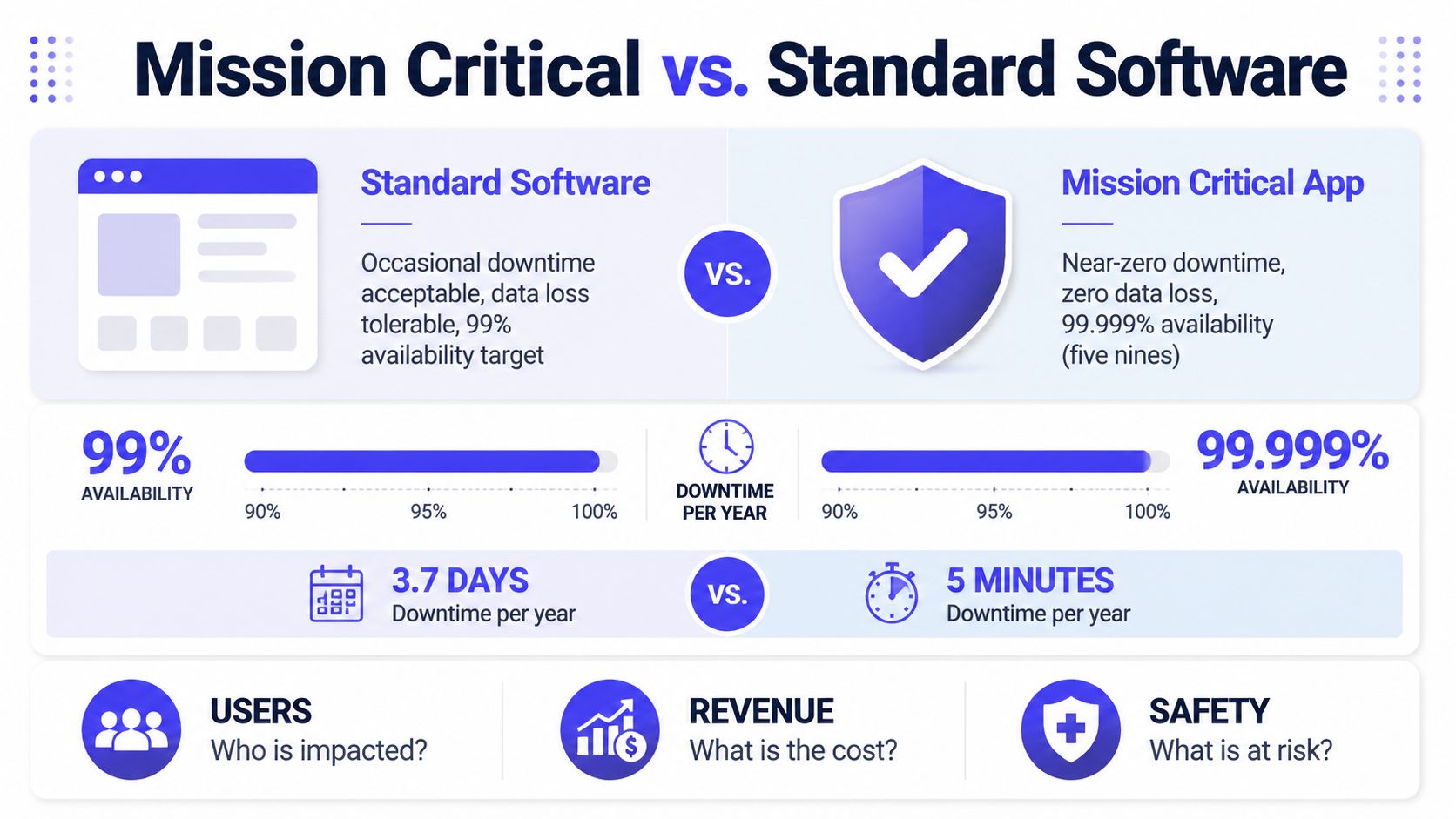
The cleanest dividing line is the service target. A standard business application may be built around more forgiving availability expectations, while a mission critical app is often engineered toward 99.999% availability, the “five nines” benchmark that allows just 5.26 minutes of downtime per year (source). That difference sounds abstract until a payment system, dispatch console, or core recordkeeping platform disappears at the wrong time.
What the benchmark really means in practice
Five nines does not mean perfection. It means the organization has accepted that outages are possible, then designed the system so recovery is fast, isolated, and controlled enough that the business can keep moving.
That is why resilience planning usually centers on redundancy, failover, and recovery objectives instead of cost minimization alone. In finance, logistics, healthcare, and public infrastructure, the wrong trade-off can create cascading damage that is far more expensive than the extra infrastructure required to avoid it.
Practical rule: if a system's failure can pause core operations, expose people to risk, or block transactions that the business can't absorb, it belongs in the mission-critical category.
Mission critical apps also show up in places teams don't always label that way. Online banking, communications platforms, traffic control, ERP, and transaction systems all fit because their failure can ripple into financial, operational, or safety consequences (source). The label comes from what breaks when the app fails, not from how elegant the product roadmap looks.
The 48-Hour Recovery Framework and Business Continuity
A mission critical app is the one the business cannot live without for long. The University of Michigan's framing is direct, a mission-critical system is one whose loss would create a serious impediment to core functions within the first 48 hours after an event (source).
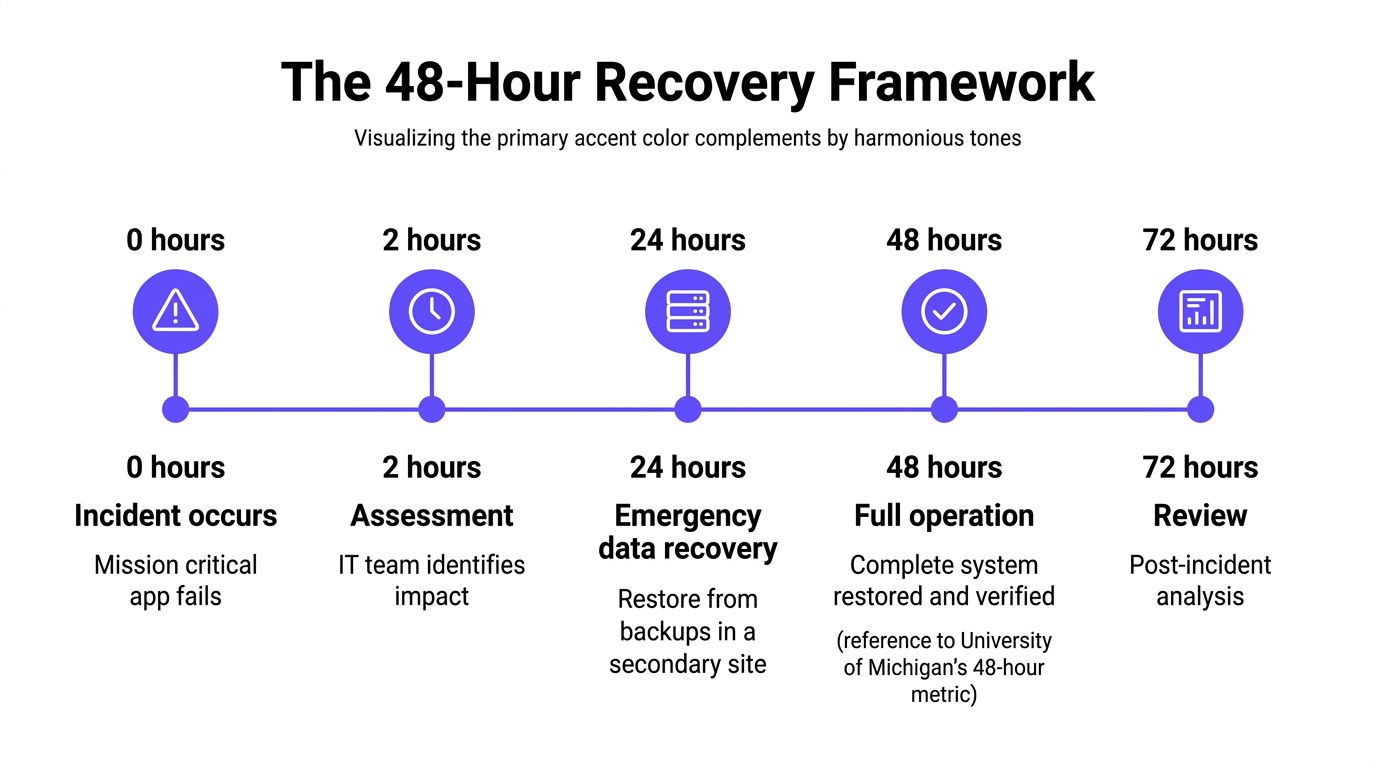
That boundary changes how continuity planning should work. A reporting portal may matter to executives, but if the business can run for a few days without it, the recovery plan should not look like the one for a dispatch console, trading platform, or clinical system.
How continuity thinking evolved
As enterprises digitized communication, storage, logistics, and financial processing, software stopped being a support layer and became part of the operating core. Disaster recovery now affects whether the organization can keep functioning, not just whether IT can restore a server.
IBM describes mission-critical applications as the systems enterprises must have functioning for normal business operations, while LeanIX notes that corruption, disruption, or failure can have a catastrophic effect on the organization. That framing is useful because it connects uptime, recovery timing, and business impact in one place, instead of treating them as separate planning exercises.
A practical recovery worksheet starts with the business process, not the application name. If finance cannot clear payments, operations cannot ship goods, or clinicians cannot reach records, recovery has to be measured in hours and in sequence, not in broad project milestones. Teams can also use sales enablement KPIs to track in 2026 to connect recovery performance with operational readiness, because the same discipline that exposes pipeline gaps can expose gaps in restore planning.
For teams designing cloud-native recovery plans, achievable RTOs in cloud-native systems is a useful reference point because it keeps the question on what can be restored fast enough to protect the business, not what looks tidy in a slide deck.
Recovery objectives should be written around the point of business harm, not around the convenience of the IT schedule.
That is also where most continuity plans fall short. Backups alone do not restore operations. The plan has to define restore paths, secondary capacity, the order in which systems come back, and who owns each test. If the restore sequence is unclear, the business loses time exactly when the pressure is highest, and the people trying to work through the outage are the first to feel it.
Architectural Requirements for Maximum Reliability
Mission critical reliability lives below the application layer. Code quality matters, but the architecture has to absorb failures in servers, storage, power, cooling, networks, and the physical environment around the system.
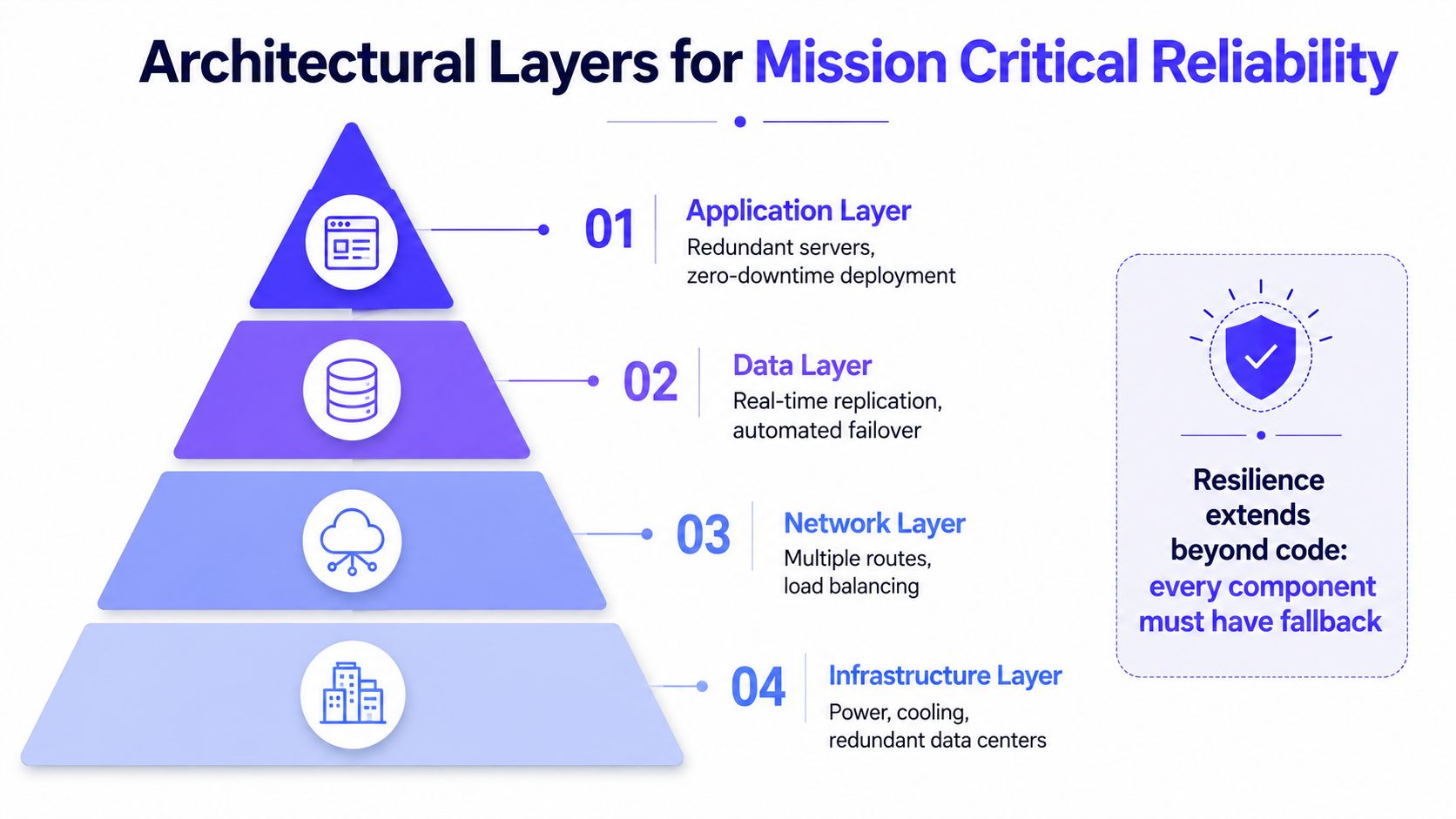
A practical reliability stack usually starts with the infrastructure layer and works upward. That means redundant facilities, conditioned power, and cooling that can tolerate failure without taking down the application, followed by network diversity, data replication, and then application-level failover.
Why hardware still matters
The hardware side is often underestimated in software-heavy organizations. Siemens' RUGGEDCOM RST2228 is rated for -40°C to +85°C operation, supports 88 to 300 VDC or 85 to 264 VAC input, and is positioned for mission-critical use because it is built for high immunity to electromagnetic interference and electrical surges (source). That is not a niche detail, it shows how physical resilience directly affects whether systems stay online in harsh environments.
The lesson is simple. A mission critical app can't be judged only by its deployment pipeline or database design. Power conditioning, thermal tolerance, and EMI resilience reduce failure probability before software even gets a chance to fail.
What actually prevents downtime
The strongest architectures use multiple layers of fallback, not one oversized rescue mechanism. In practice, that means redundancy, automatic failover, strict service-level targets, and a design that assumes some component will fail.
- Application layer: keep multiple instances ready so one bad node doesn't become an outage.
- Data layer: replicate data in real time and verify failover behavior, because the database is usually the first system that makes an outage hurt.
- Network layer: use more than one path or route, so a single transport issue doesn't isolate users.
- Infrastructure layer: protect power, cooling, and physical sites, especially where operational loss has a safety or compliance cost.
For a concise overview of the concept, what is high availability is a useful starting point because it reinforces a key distinction, high availability is not a slogan, it's a set of engineering choices that reduce the chance of visible failure.
The organizations that get this right don't ask whether they can afford redundancy. They ask what happens if they skip it, and who pays when the skipped layer becomes the one that breaks.
The Overlooked Human Factor in Mission Critical Design
A system can be technically resilient and still fail the moment a human has to use it under pressure. In healthcare and other high-stakes settings, mobile health research repeatedly points to offline functionality, early user involvement, guidance and manuals, and low-friction interaction as facilitators of successful adoption, while limited health literacy, low agency, and mistrust create real barriers (source).
That means mission critical apps are not only about infrastructure. They also need to work when users are tired, nervous, interrupted, or operating on a weak connection. If a caregiver, technician, dispatcher, or field worker can't complete the task quickly, the app has failed its mission even if the backend stayed up.
Usability under stress is a reliability issue
Design teams often treat usability as a nice-to-have after the architecture is done. That's backward in mission-critical contexts, because an interface that takes too much attention under stress can create operational errors, delays, or workarounds that bypass the system entirely.
Early user involvement changes that outcome. When frontline users help shape the workflow, teams can catch problems that won't show up in a lab environment, like confusing labels, too many steps, or a screen that assumes stable connectivity. Those are not cosmetic issues, they are failure points.
The practical standard is straightforward. If the app demands calm, uninterrupted attention to function, it is not ready for critical use.
Offline resilience changes who can use the system
Offline capability is not just a field-service convenience. In mission-critical environments, it can be the difference between a completed workflow and a stalled one. When a network drops, the app should degrade gracefully, preserve local work, and sync later without corrupting data or forcing the user to start over.
When users are under stress, the best interface is the one that gets out of the way and still completes the job.
That point is especially visible in healthcare, emergency response, logistics, and inspection work. In all of those settings, the person at the edge of the system may not have the luxury of waiting for a retry spinner or a perfect connection. The app has to make the right action easy, obvious, and recoverable.
The section above on infrastructure explains how to keep the service online. This layer explains whether the person on the other end can do the work once it is online.
Real-World Mission Critical Applications Across Industries
Mission critical requirements do not look identical across sectors. The same principles, redundancy, failover, recovery objectives, and rigorous validation, are applied differently depending on whether the priority is money movement, public safety, supply chain continuity, or clinical access.
Mission Critical Applications by Industry
| Industry | Example Systems | Uptime Target | Primary Failure Consequence | Key Architectural Priority |
|---|---|---|---|---|
| Banking | Online banking, payment processing | Five nines is often the relevant benchmark | Failed transactions, customer impact, financial loss | Transaction integrity and rapid failover |
| Traffic control | Control and coordination platforms | Extremely tight availability expectations | Safety risk and operational disruption | Defensive redundancy and controlled recovery |
| ERP | Supply chain and enterprise backbones | High availability expectations | Delayed fulfillment and broken workflows | Data consistency across core processes |
| Customer transactions | Checkout and ordering systems | High availability expectations | Direct revenue loss and abandoned transactions | Low-latency response and continuity |
| Communications | Messaging and network services | High availability expectations | Broad service interruption | Network resilience and layered backup |
| Healthcare | Clinical and operational systems | High availability with offline tolerance where needed | Care delays and access risk | Usability, offline support, and dependable recovery |
The fintech case is especially unforgiving. Why uptime matters in fintech is worth reading because financial systems expose the cost of downtime more clearly than most categories of software do. In that environment, every failure touches trust, settlement, customer experience, and compliance at the same time.
What matters across industries is the failure mode. A checkout site may lose revenue in the moment, while a traffic system or health platform can create a much broader safety and service impact. The architecture should reflect that difference instead of pretending all outages are equal.
The most common mistake is to give every application the same reliability package. A reporting tool doesn't need the same treatment as an order management system, but a customer-facing transaction flow probably does need far more rigor than a team wiki.
Equitable Access as a Reliability Requirement
Mission critical design breaks down when it assumes every user has the same device, language comfort, bandwidth, or digital habits. Implementation research on digital health technologies shows that inequalities can worsen when apps assume stable connectivity and high digital fluency, while targeted deployments for underserved communities emphasize bilingual support, localized information, and texting as a least-common-denominator channel (source).
That's not an accessibility add-on, it's part of reliability. A workflow that works for one group and fails for another is not reliably mission critical, it's selectively functional.
Last-mile failure is still failure
A lot of enterprise design stops at the data center boundary. The system is considered “available” if the servers are healthy, even if the user on a low-cost phone, in a noisy clinic, or on a limited network can't complete the task.
That gap matters most in large, diverse markets. Low-income users, multilingual users, and intermittently connected users are often the ones most affected when the product assumes constant connectivity or flawless digital literacy. If those groups are part of the operational workflow, the design has to be built for them from the start.
Texting is useful here because it strips away friction. It isn't glamorous, but it is often the most dependable channel when apps, portals, or rich interfaces become too heavy for the situation.
Equity belongs in the reliability spec
Bilingual support and localized content should be treated as operational requirements when the service serves diverse populations. They reduce confusion, shorten task completion time, and lower the chance that users bypass the system with unsafe workarounds.
A mission critical app that excludes part of its user base has a design flaw, not a communication problem.
Many enterprise programs get it wrong. They test the app in headquarters conditions, then declare victory after a successful deployment. In the field, however, the system may still fail because the users who most need it can't use the interface, can't read the default language confidently, or can't stay connected long enough to finish.
Reliability includes reach. If the workflow is critical, access has to be critical too.
Evaluating Whether Your Application Qualifies as Mission Critical
The classification question is simpler than many teams make it. Start with failure consequence, then add recovery timing, user diversity, and operational dependency. If the answer keeps pointing toward business paralysis, the application belongs in the mission-critical tier.
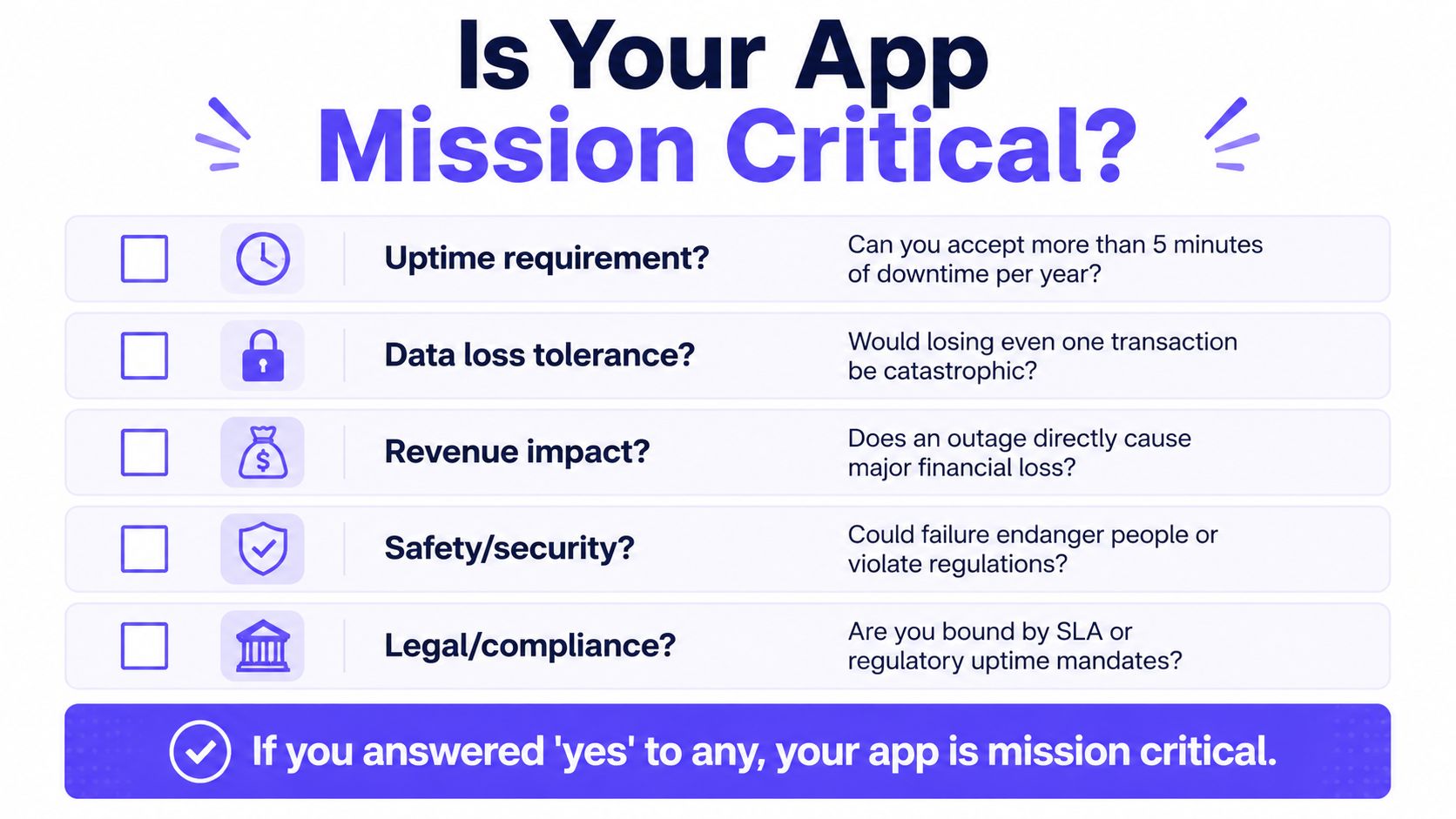
The cleanest way to assess the portfolio is to ask a small set of hard questions:
- Uptime requirement: can the business accept more than a few minutes of downtime in a year, or does the outage immediately hurt core operations?
- Data loss tolerance: would losing even one transaction, record, or update be unacceptable?
- Revenue impact: does the outage directly stop money movement or customer conversion?
- Safety and security exposure: could the failure endanger people, violate regulations, or compromise protected processes?
- Legal or compliance pressure: is the system bound by contractual uptime expectations or regulatory obligations?
To make the review more concrete, the internal guide on usage-based pricing model a practical guide is a useful reminder that capacity planning and consumption patterns matter because the true cost of resilience often rises with usage, complexity, and the number of stakeholders involved.
If the answer is yes to any of the questions above, the app should be treated as mission critical and designed accordingly. That doesn't mean every component needs the same level of investment, but it does mean the organization should be explicit about redundancy, failover, restore testing, and the human experience of recovery.
The best programs classify systems by consequence, not by politics. Once that distinction is clear, the budget conversation gets easier, because the cost of resilience can be compared against the cost of failure instead of against a generic IT line item.
Overvue helps teams make critical decisions with clearer evidence, which is exactly what mission critical app planning needs when stakes are high and assumptions are expensive. If you're mapping the systems that can't afford weak recovery, fragile workflows, or poor user readiness, visit Overvue to see how structured evaluation can support sharper decisions.