
AI is already in sales. They just haven't turned it into a repeatable operating system yet. Salesforce's projected 2026 State of Sales report says 81% of sales teams use AI today, while LinkedIn's 2025 State of Sales found 56% of sales professionals use AI daily. ZoomInfo's 2025 survey of more than 1,000 go-to-market professionals adds another useful detail: 45% of sellers use AI at least once a week, but 42% use it only a few times a year or not at all (Salesforce report reference).
That split changes the question. It's not whether sales teams should use AI. It's how to use AI in sales without creating sloppy outreach, tool sprawl, or manager workflows nobody sticks with.
The practical answer starts by moving beyond email generation. Drafting messages matters, but the larger opportunity sits closer to rep behavior: how sellers prepare, how they run calls, how managers coach, and how hiring teams evaluate real selling skill before they hand someone a quota.
Why AI in Sales Is Now Mainstream and Still Underused
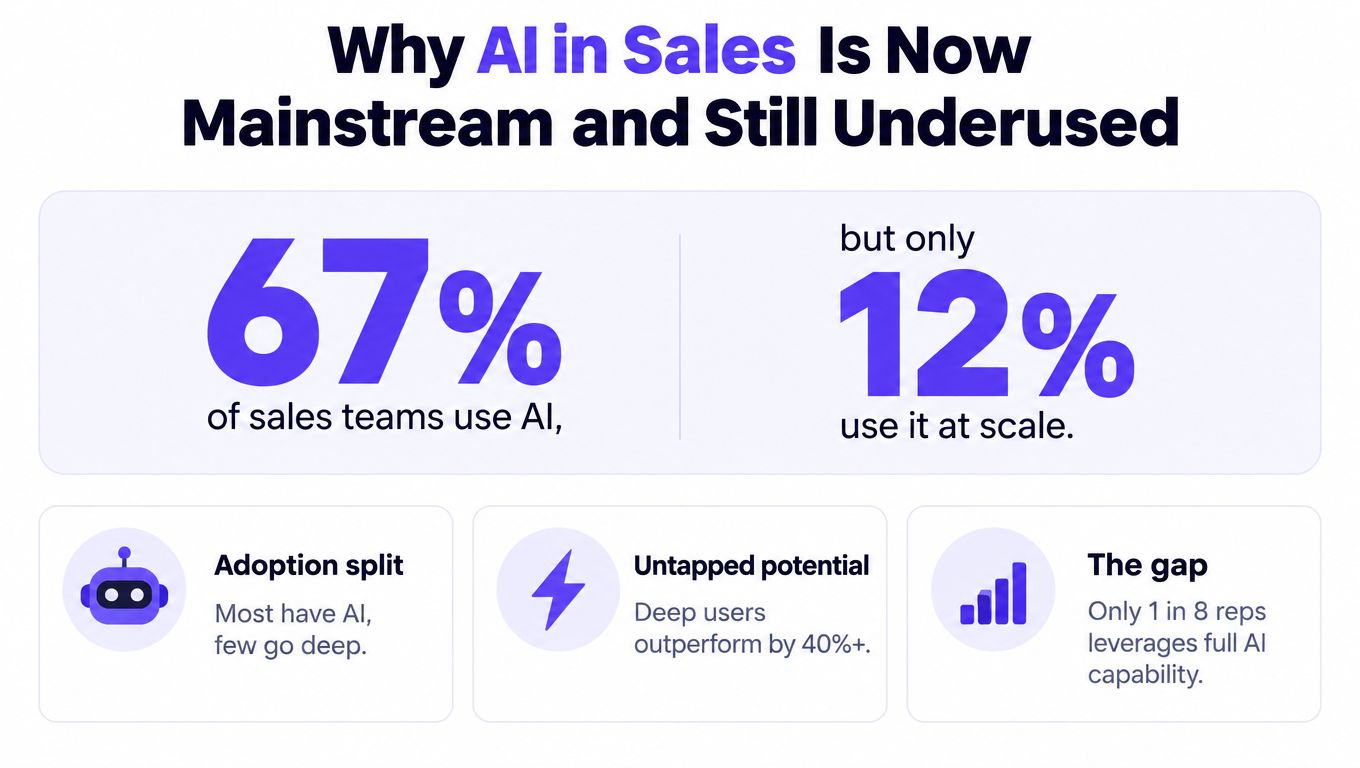
The fastest way to misunderstand AI in sales is to treat access as adoption. Many teams already have AI in the stack, but that doesn't mean reps use it in a consistent, trusted way.
Broad adoption doesn't equal operational use
The market has clearly moved past the experiment phase. Cirrus Insight's summary of sales research says AI adoption among sales reps rose from 24% in 2023 to 43% in 2025, a 79% increase over that period, and reported that daily AI users were twice as likely to exceed targets as non-users. The same summary also says early AI deployments in sales boosted win rates by more than 30% (Cirrus Insight summary).
Those numbers matter because they tie AI to quota and win rates, not novelty. But they also hide a common rollout problem. Teams often deploy AI for one narrow use case, usually writing emails faster, then assume the organization has “done AI.”
It hasn't.
Practical rule: If AI lives in a side tab instead of inside the rep's real workflow, adoption usually stays shallow.
The underuse problem shows up in manager workflows
The harder problem isn't feature availability. It's operating discipline. Futurum's coverage of 2026 AI agent trends notes that 87% of sales organizations now use some form of AI, yet only 54% of sellers report using AI agents. The same coverage highlights blockers that stall rollout, including security concerns, tech silos, data quality, and integration problems. It also notes that only 6% of sellers use AI for task prioritization, 53% need more time and training, 51% of AI-enabled sales leaders say tech silos slow or limit initiatives, and 51% of sales pros say security concerns delay rollout (Futurum analysis).
That's why this is a leadership issue, not a rep experimentation issue. Teams that want a good framing of why AI belongs to sales leaders should look at the management side of the problem first: workflow design, standards, and accountability.
What separates useful AI from noisy AI
AI works when it reduces friction around work reps already need to do. It fails when it adds one more system, one more prompt to remember, or one more place for notes to die.
Three signs of useful adoption are easy to spot:
- Reps use it inside existing motion. It supports call prep, CRM updates, follow-ups, and coaching without extra admin.
- Managers can inspect output. Call summaries, scoring, and prompt usage are visible and reviewable.
- The workflow is standardized. Teams know when AI drafts, when humans review, and where judgment still matters.
The rest of this roadmap focuses on those mechanics. That's where AI stops being a writing assistant and starts becoming a sales execution system.
Where AI Actually Helps in the Sales Workflow
Not every sales task deserves automation. Some need acceleration. Others need judgment. The best AI use cases earn trust quickly because reps can feel the value without worrying that the tool is freelancing with customer relationships.
High-trust use cases to start with
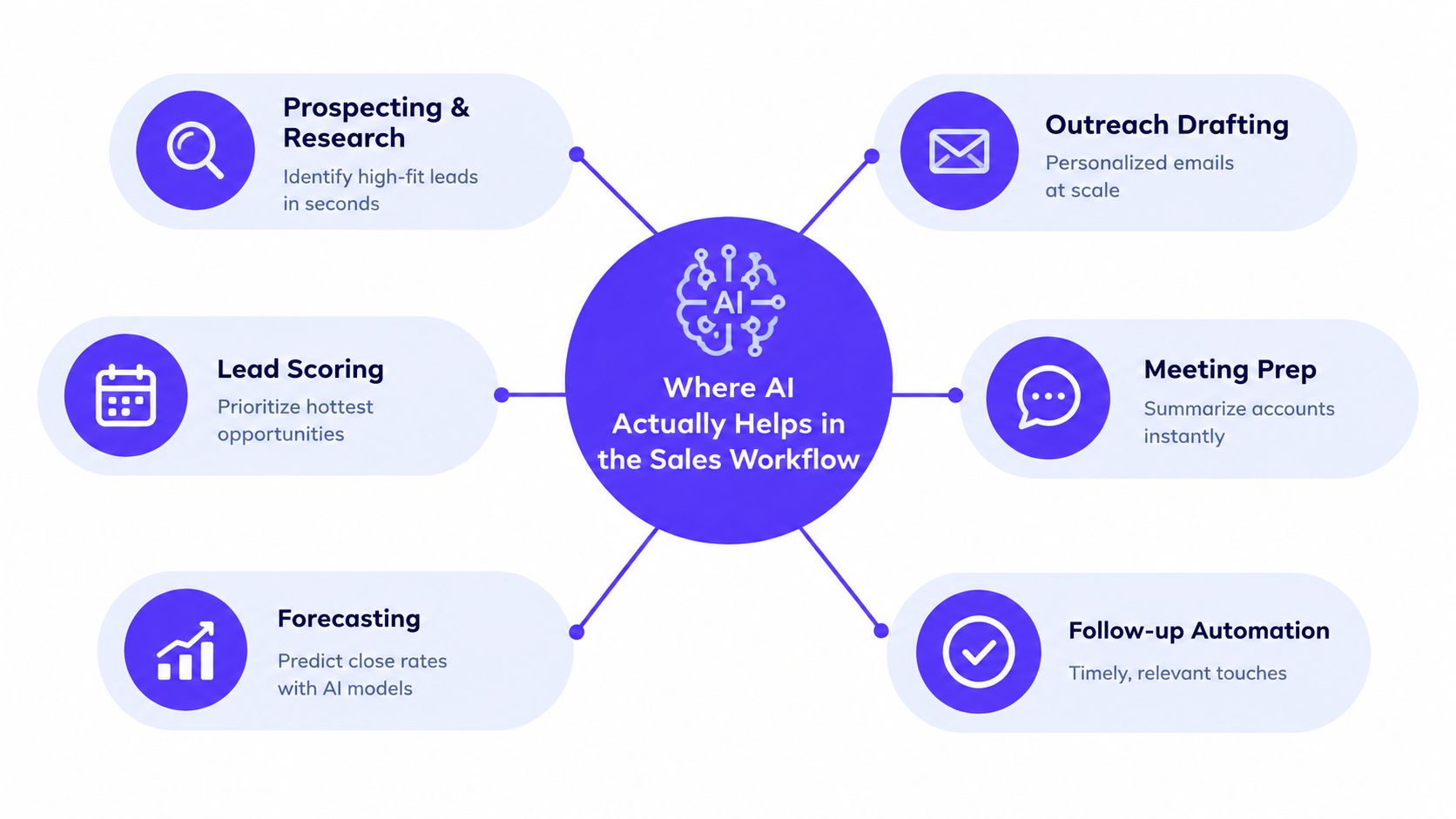
The strongest early use cases usually sit in prep, prioritization, and post-call cleanup.
-
Prospecting and research
AI is useful when it compiles account context, role-specific pain points, recent company activity, and likely objections into a short brief. It saves time before outreach and before discovery calls. -
Outreach drafting
AI can produce a first draft faster than most reps can. The catch is that reps still need to edit for relevance, tone, and accuracy. Drafting is high value. Blind sending is not. -
Lead scoring and queue prioritization
AI can improve daily execution. Reps benefit more from a ranked list with reasons than from another dashboard full of vague signals. -
Forecasting support
AI helps when it surfaces risk patterns, stale deals, missing stakeholders, or inconsistent next steps. It doesn't replace manager judgment, but it gives managers a cleaner starting point for review.
Where automation often hurts trust
The weakest use cases are the ones that remove human review from buyer-facing moments.
A common mistake is letting AI auto-send emails that sound personalized but miss the account context. Another is using generic call guidance that pushes rigid scripts into complex conversations. Reps stop trusting the system once it creates awkward moments with prospects.
Low-trust automation usually fails for one simple reason. The team is optimizing for output volume instead of conversation quality.
Augmentation beats autopilot in live selling
The most overlooked answer to how to use AI in sales is this: use it to improve how sellers think and respond, not just how fast they type.
That means using AI to generate:
- ICP-specific talk tracks before a first meeting
- Objection trees tied to buyer role, competitor pressure, and implementation concerns
- Discovery question sets based on stage and segment
- Post-call coaching prompts that tell a manager what to inspect
For teams evaluating assistants for top-of-funnel work, a tool like EmailScout AI sales assistant is one example of the research and drafting category. The more important decision is less about the brand and more about whether the tool supports reviewed drafting instead of unsupervised outreach.
What should be piloted first
A useful first pilot usually combines one efficiency use case and one quality use case.
| Use Case | Why It Works Early | Watch-Out |
|---|---|---|
| Call summaries and CRM note capture | Reps feel the time savings immediately | Bad summaries create cleanup work |
| Meeting prep briefs | Improves relevance before live conversations | Weak data inputs produce generic prep |
| Drafted follow-up emails | Speeds execution after calls | Unedited drafts can sound hollow |
| Objection handling practice | Improves rep behavior, not just activity | Needs realistic scenarios |
| Forecast review support | Helps managers inspect deals faster | Can create false confidence if pipeline data is messy |
The priority isn't to automate the whole funnel. It's to choose use cases where reps can say, within a week, “this made me better prepared” or “this saved me real time without lowering quality.”
How to Choose AI Sales Tools Without Creating Tool Sprawl
Most AI sales stacks become messy for the same reason old sales stacks did. Leaders buy point solutions faster than they redesign workflow. The result is predictable: duplicated data, conflicting outputs, unclear ownership, and reps working around the system.
Start with workflow, not demos
Before comparing tools, teams need a short list of workflow questions:
- Where does the rep already work most of the day? Usually the CRM, sales engagement platform, calendar, and call recording tool.
- What decision does the AI need to support? Prioritize, prepare, summarize, coach, assess, or forecast.
- Who owns the output? The rep, the manager, recruiting, enablement, or revenue operations.
- What happens after the output appears? If nobody acts on it, the tool becomes shelfware.
A flashy interface won't fix a fuzzy process.
The checklist that matters
The fastest way to avoid tool sprawl is to score every option against the same practical criteria.
| Evaluation Criteria | What Good Looks Like | Red Flag |
|---|---|---|
| CRM fit | Native or low-friction integration with core CRM workflows | Reps must copy and paste between systems |
| Data quality tolerance | Useful outputs even when some records are incomplete | Tool breaks or hallucinates when CRM data is uneven |
| Security and permissions | Clear admin controls, role-based access, auditable activity | Reps use personal accounts or unapproved uploads |
| Scoring consistency | Stable evaluation criteria across users and scenarios | Scores change based on who set up the workflow |
| Manager usability | Managers can review outputs quickly inside existing cadence | Separate dashboard nobody checks |
| Workflow embed | Triggers inside normal selling motion | Requires reps to remember extra manual steps |
| Multilingual and remote fit | Supports distributed teams and varied hiring or coaching contexts | One-language setup that fragments global teams |
| Capacity model | Usage aligns with actual hiring or coaching demand | Rigid licensing that encourages overbuying |
For enterprise teams building standards around AI governance and rollout, mission-critical apps and enterprise adoption standards is a useful lens for separating experimental apps from systems that can hold up under real operating pressure.
Point tool or platform
There isn't one right answer. There is a right fit for the workflow.
A point tool is often enough when the use case is narrow and measurable, such as meeting summaries or outbound drafting. A platform approach makes more sense when several workflows need shared data, shared permissions, and shared reporting.
A good buying question is simple. Will this tool replace steps in the current process, or will it add one more layer for reps to manage?
A shortlist should include behavior tools, not just content tools
Many teams over-index on prospecting software because the value is easy to explain. Fewer teams assess tools that improve live execution. That's backwards.
If the company hires aggressively, coaches distributed teams, or struggles with manager consistency, the shortlist should include behavior-focused products. Overvue fits that category by simulating live sales conversations based on a company's ICP and scoring candidates or reps against defined criteria such as objection handling, call control, responsiveness, and next-step execution.
That kind of capability won't replace note-taking tools or forecasting tools. It serves a different need. It standardizes evaluation and practice where human roleplays often vary too much to be reliable.
Integrating AI Into Your CRM and Daily Sales Routines
Most AI rollouts fail in the handoff between purchase and habit. The tool works. The workflow doesn't. Reps need to open one more tab, prompts are inconsistent, managers don't inspect usage, and adoption fades.
A cleaner rollout starts inside the CRM and follows the rep's normal day.
What a workable rollout looks like
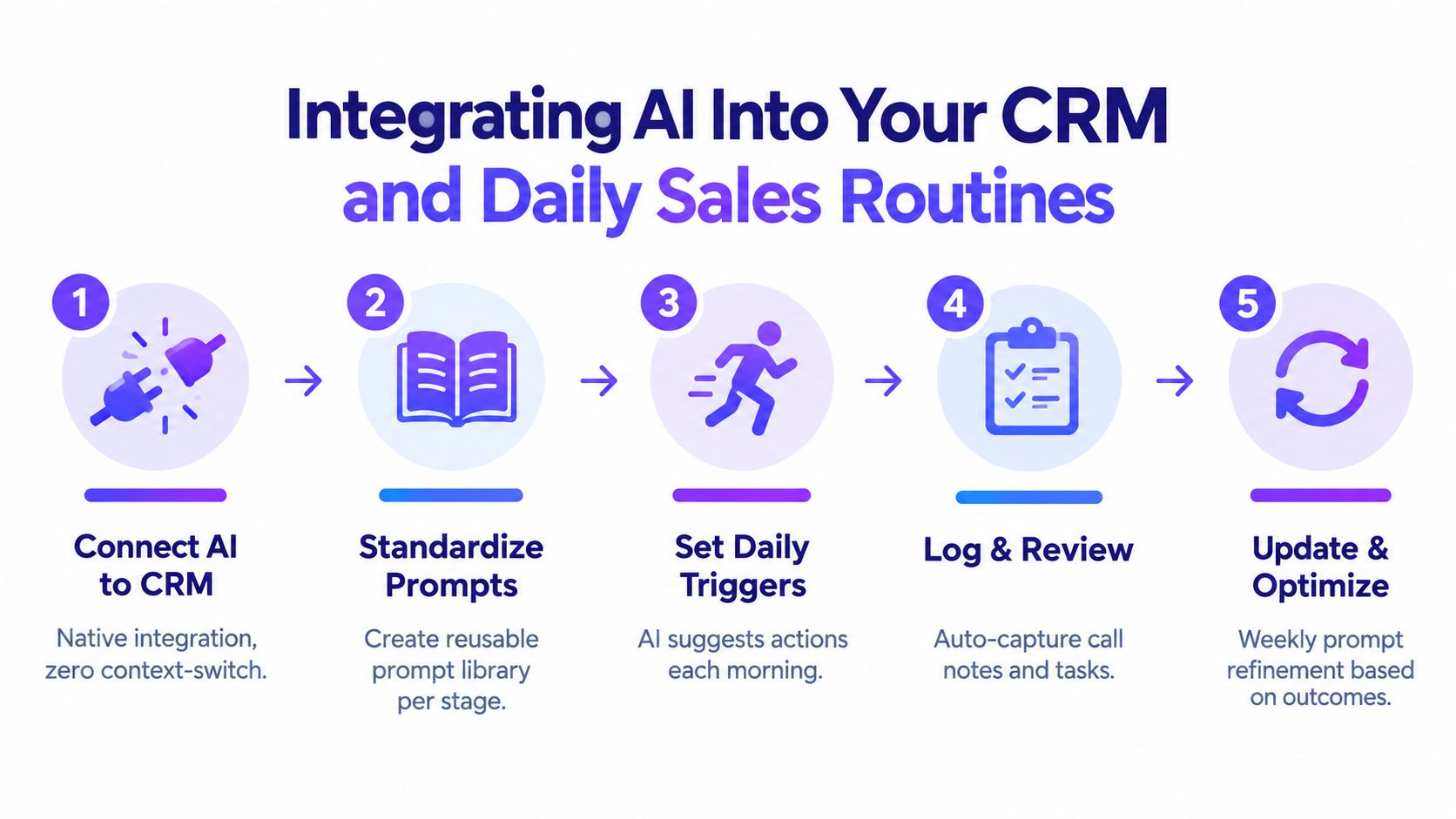
A practical sequence usually has five moves.
-
Connect one AI workflow to the CRM first
Start with a job reps already do every day, such as call summaries, follow-up drafting, or account prep. -
Standardize prompts by stage
Discovery, demo, proposal, and renewal all require different output. Teams should save approved prompts instead of asking each rep to improvise. -
Set daily triggers
The rep should know exactly when to use AI. Before first meetings, right after calls, and during pipeline review are better triggers than “use this when helpful.” -
Give frontline managers ownership
Managers should inspect outputs during one-on-ones and team reviews. If leaders don't use the outputs, reps won't either. -
Run office hours and guardrails together
Training alone isn't enough. Teams need rules for approved usage, what can be uploaded, where outputs get stored, and when human review is mandatory.
A before and after routine
Before integration, a seller ends a call and opens four systems. Notes sit in one place, action items in another, and CRM updates happen later if they happen at all. Follow-up emails get written from memory, and manager coaching depends on whatever details survive until the next one-on-one.
After integration, the rep ends the call and sees a draft summary, next steps, and suggested follow-up inside the normal workflow. The manager reviews the same record later and coaches against actual conversation details, not reconstructed memory.
That's the difference between AI as a feature and AI as process infrastructure.
Where change management usually breaks
Berkeley-related findings cited in Debriefing's coverage add an important caution. 55% of sales teams say they lack the right AI toolset, 53% need more time and training, and only 21% of sales leaders felt confident in their understanding of generative AI in that study context (Debriefing coverage).
Those numbers explain why generic rollout emails don't work. Reps need examples tied to their actual day, and managers need simple inspection habits.
A solid manager cadence includes:
- Monday review of AI-prioritized accounts or follow-ups
- Midweek coaching on one call summary and one email draft
- Friday cleanup to refine prompts based on what produced useful output
Teams don't need more AI prompts. They need fewer prompts, used more consistently.
Guardrails that keep adoption healthy
A few rules keep the rollout from drifting into shadow AI:
- Approved inputs only so reps aren't pasting sensitive customer details into random tools
- Named use cases so the team knows what AI is for and what it isn't for
- Manager-visible outputs so coaching and accountability stay linked
- Prompt libraries so quality doesn't depend on whoever writes the cleverest request
When AI shows up inside the CRM, inside manager cadence, and inside stage-specific playbooks, usage stops feeling optional.
Using AI to Assess Coach and Ramp Sales Talent Faster
The most valuable AI use case in sales may have less to do with prospecting and more to do with behavior quality. Sales teams already know how to generate activity. The harder challenge is improving how reps handle objections, control conversations, qualify urgency, and secure real next steps.

Assessment should sound like the real job
Most hiring loops still overvalue confidence, interview polish, and resume familiarity. Those signals matter, but they don't prove that a candidate can run a live sales conversation.
AI changes that when companies build roleplays from real ICP inputs:
- buyer role
- company context
- common pains
- likely objections
- competitor references
- existing tech stack
- deal stage pressure
A candidate can then complete the scenario asynchronously through a secure link, and the hiring team can review the same observable behaviors across every candidate. That removes much of the inconsistency that comes from interviewer-led roleplays.
Coaching gets better when the rubric is stable
The same logic applies after hiring. Manager coaching often varies by style, time pressure, and memory. AI-supported roleplay and scoring can anchor coaching in a consistent rubric.
Useful criteria include:
| Skill Area | What Managers Should Look For |
|---|---|
| Objection handling | Does the rep acknowledge, clarify, and reframe instead of deflecting? |
| Call control | Can the rep guide the conversation without sounding rigid? |
| Responsiveness | Does the rep answer what the buyer actually said? |
| Discovery depth | Are follow-up questions specific and commercially relevant? |
| Next-step execution | Does the rep earn a concrete commitment before the call ends? |
For teams exploring this category, AI sales roleplay is worth examining as a method, especially when the goal is standardization across hiring, onboarding, and manager-led coaching.
Shared scenarios create a cleaner ramp
One of the strongest operating habits is to use the same scenario family across three stages:
-
Hiring assessment
Can the candidate handle the conversation at all? -
New-hire onboarding
Can the rep improve against the same buyer pattern once messaging is taught? -
Ongoing coaching
Can the team keep sharpening the behavior under changing objections or personas?
This creates continuity. Reps aren't practicing random scripts. They're developing repeatable skill in scenarios that match the actual market.
The best coaching environments don't just tell reps what good looks like. They force reps to demonstrate it repeatedly under comparable conditions.
Why this matters more than another email prompt
Prospecting automation gets attention because it's easy to see. Behavior improvement is quieter, but it compounds in better conversations, cleaner qualification, and more consistent manager coaching.
That matters even more when manager time is limited. A standardized simulation can create practice volume without risking pipeline, and team analytics can show where the group struggles by skill, persona, or objection type. Leaders can then target coaching where it's needed instead of relying on anecdotal call reviews.
For companies trying to figure out how to use AI in sales beyond productivity hacks, the technology starts to affect rep quality directly.
Measuring Impact and Scaling What Works
AI projects usually lose credibility when leaders overclaim results or track the wrong signals. The cleanest approach is to measure behavior change first, then connect it to business outcomes over time.
Start with leading indicators
Before looking at quota or win rates, inspect whether the workflow is being used well. Teams should track operational indicators such as:
- CRM completion quality
- Follow-up speed after meetings
- Manager coaching completion
- Rep participation in simulations or practice
- Consistency of scoring across candidates or reps
- Use of approved prompts and workflows
These are the early signs that the system is becoming durable.
Then connect to lagging outcomes
Once usage is stable, leaders can look at business metrics such as opportunity progression, ramp quality, forecast confidence, and conversion performance. The key is not to assign every improvement to AI automatically.
A stronger method is to compare the workflows that changed against the workflows that didn't. If call coaching became standardized but prospecting didn't, leaders should inspect the coaching-linked outcomes first.
For sales leaders building a balanced view, sales performance metrics is a useful framework for separating activity volume from actual execution quality.
What should scale and what should stop
Not every pilot deserves expansion. The ones worth scaling usually share three traits:
- Reps keep using them without reminders
- Managers can inspect quality quickly
- The workflow improves consistency, not just speed
The workflows to stop are just as easy to identify. They generate lots of text, little action, and almost no trust. If reps rewrite every output from scratch or avoid opening the tool before customer calls, the workflow isn't helping.
A practical scaling checklist is short:
- Keep one owner per workflow
- Document approved prompts and review rules
- Build manager inspection into weekly cadence
- Retire overlapping tools
- Expand only after a pilot becomes routine
Sales teams don't need AI everywhere. They need it in the few places where it changes seller behavior, manager consistency, and hiring quality in a repeatable way.
Overvue helps sales teams apply AI where it has the hardest-to-fake value: live selling behavior. It gives hiring and enablement teams a way to run standardized AI sales assessments and practice scenarios based on real ICP conversations, then score reps against consistent criteria for coaching and comparison. To see how that fits a practical AI rollout in sales, visit Overvue.