
45 WPM is slightly above the global adult median of 41.6 WPM, so it's good for general office tasks. It's still below the 60 WPM level often treated as the professional comfort threshold for typing-heavy roles, which is where speed starts to matter more in day-to-day revenue work.
For sales and office communication, that distinction matters. A person at 45 WPM can keep up with routine email, note-taking, and standard admin work, but the moment typing becomes part of live selling, CRM updates, or rapid follow-up, every correction starts to interrupt momentum.
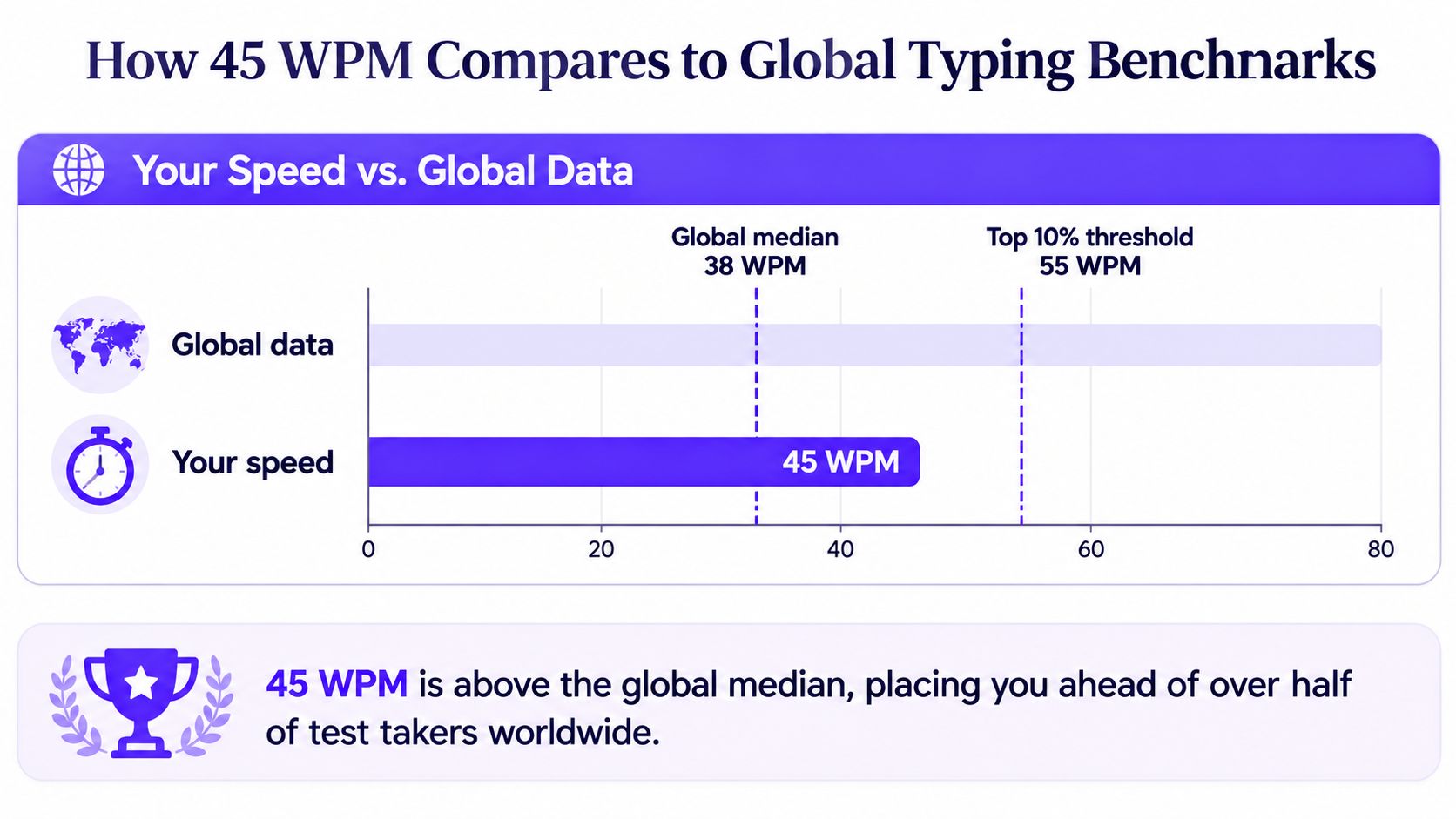
How 45 WPM Compares to Global Typing Benchmarks
A 45 WPM typing speed sits above the global median, which is reported at 41.6 WPM in a large-data estimate based on 10.4 million audited tests, and it also sits above the commonly cited adult average of about 40 WPM (average typing speed benchmark). That means the number is not a weakness in a broad population sense. It's a workable baseline for everyday knowledge work.
What “good” means depends on the task
The problem is that good is a moving target. A speed that feels perfectly adequate for email and note-taking can still be too slow for jobs that depend on constant keyboard input. The same benchmark set that treats 45 WPM as a solid everyday pace also notes that 50 to 60 WPM is often described as good for most contexts, while 60 WPM with high accuracy is a stronger professional benchmark (good WPM by profession).
For a practical reference point outside general office work, a resource on measuring court reporter words per minute shows how specialized typing expectations can become when speed is central to the role. That contrast matters because it highlights the core issue here, 45 WPM is good enough for many tasks, but not all jobs value speed the same way.
The real takeaway from the benchmark data
A speed around 45 WPM places someone roughly in the middle of the adult distribution, not at the bottom and not at the fast end (typing speed guide). That's why the answer to is 45 words per minute good is yes, but only if the work is ordinary office communication rather than a role built around constant typed output. For hiring teams, that distinction is more useful than a simple average label, because the work pattern, not the number alone, determines whether the speed is competitive.
Practical rule: if the job is mostly email, notes, and basic documentation, 45 WPM is usually fine. If the job depends on repeated fast typing throughout the day, it's usually not enough on its own.
Typing Speed Expectations by Professional Role
Typing expectations change sharply by role, and that's where the answer gets more useful for hiring and self-assessment. A general office worker can often function well at 45 WPM, but roles with frequent documentation or client response demands start to expect more. Benchmarks from profession-based typing guidance place administrative and customer support work around 50 to 70 WPM, entry-level data entry around 60 to 80 WPM, and medical transcription at 65 WPM or more in many cases (good WPM by profession).
| Role Category | Expected WPM Range | 45 WPM Assessment |
|---|---|---|
| General office work | Often around the common adult range | Usually sufficient |
| Administrative and customer support | 50 to 70 WPM | Slightly below the usual comfort band |
| Entry-level data entry | 60 to 80 WPM | Below typical hiring expectations |
| Medical transcription | 65 WPM or more | Below the common baseline |
| Court reporting on stenotype | 225 WPM with very high accuracy | Not comparable to standard keyboard typing |
The pattern is clear. The more a role depends on live keyboard throughput, the less comfortable 45 WPM looks. That doesn't mean the speed is poor, it means the role is more demanding than general office work.
Sales hiring puts the number in context
Sales teams often care less about raw typing talent than about how quickly a rep can move from conversation to action. That's why a role-based screen can be helpful, especially when you're comparing candidates for execution-heavy openings. A useful internal reference for that kind of role analysis is the sales hiring guide, which fits naturally into broader candidate evaluation rather than typing alone.
For sales ops, SDR support, and administrative coordination, 45 WPM can still be enough if the person is accurate and organized. But when the work includes rapid CRM entry, immediate follow-up, and heavy handoff notes, the benchmark starts to matter more. In those cases, speed becomes part of operational friction, not just a personal skill metric.
What employers should infer from 45 WPM
A candidate at 45 WPM isn't automatically underqualified. The number indicates they're better suited to workflows where typing is a support function, not the center of the job. In hiring, that's a valuable distinction because it helps separate “can do the work” from “can do it without slowing the team down.”
Why Accuracy Matters More Than Raw Speed
Raw WPM is a blunt metric. It shows how quickly someone can move across the keyboard, but it does not show how much of that effort turns into usable work. Typing references consistently point out that net WPM matters more than gross speed, because errors reduce the score and add correction time that cuts into productivity (accuracy and net WPM guidance).
Net speed beats messy speed
A common benchmark pairing is 45 WPM at about 90% accuracy, while 55 WPM at 95% accuracy and 65 WPM at 100% accuracy represent more advanced performance bands (typing benchmark guidance). The point is not that everyone should chase perfect scores. A faster typist who stops to fix errors may produce less usable output than a steadier typist who keeps the text clean.
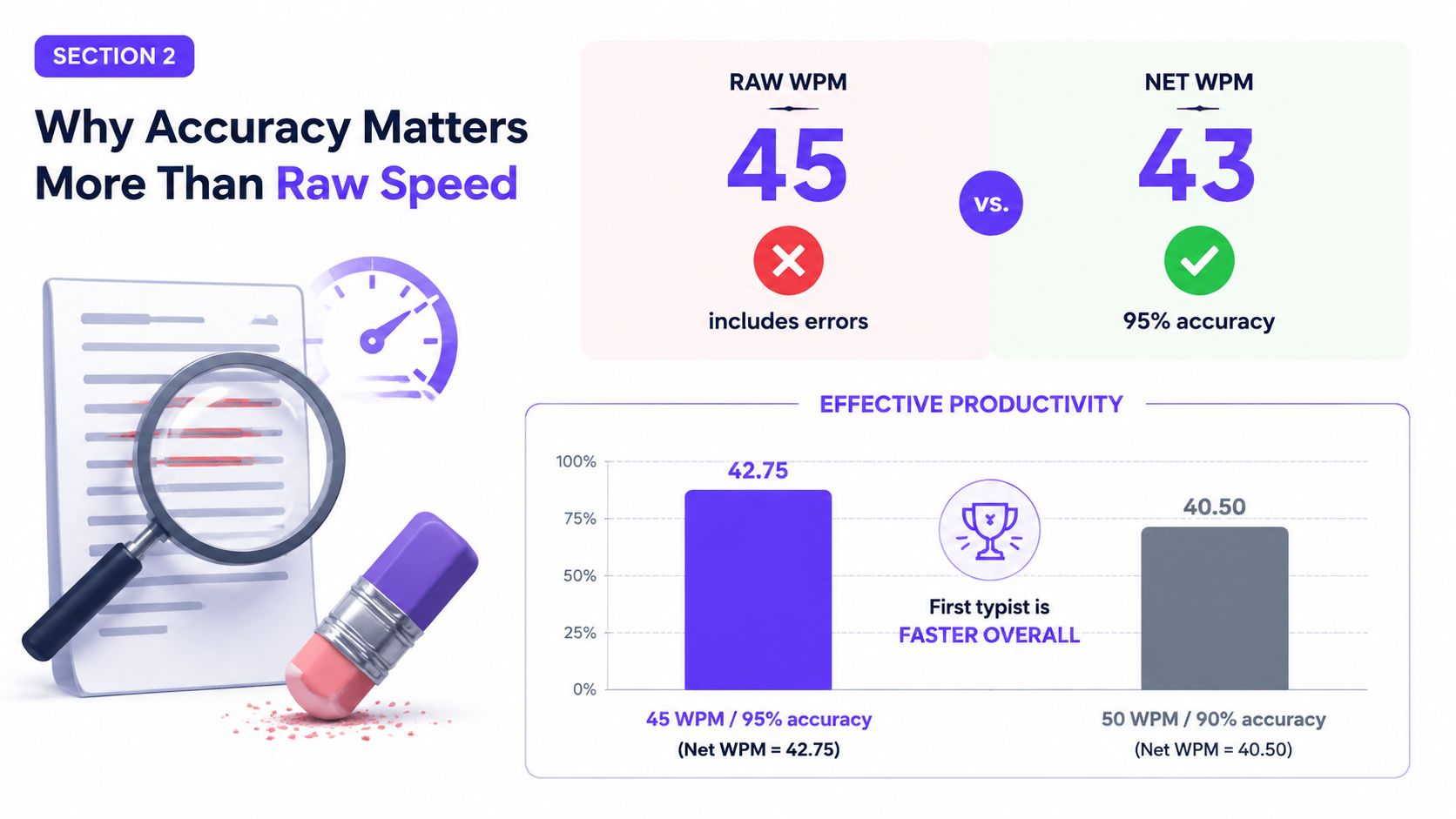
That is why the phrase is 45 WPM good cannot be answered without asking how accurate the person is. A clean 45 WPM run can outperform a sloppy faster run in real work, especially when the text is client-facing or time-sensitive. In sales communication, where message quality affects trust, every correction breaks momentum and creates avoidable friction.
The hidden cost of fixing mistakes
Every correction interrupts focus. In a CRM update, that interruption can lead to incomplete notes, missed follow-up details, or a delay in moving a deal forward. In an outbound email, it can turn a quick touchpoint into a slower one because the writer has to stop, review, and repair the sentence before sending.
Bottom line: typing speed only matters after the text is accurate enough to use without cleanup.
For hiring managers, that means a candidate who scores modestly on WPM but strongly on accuracy may be a better operational fit than a faster, sloppier typist. For individual contributors, the better improvement target is not just “type faster,” it is “type fast enough without creating rework.” That is the threshold where productivity starts to show up in the workflow.
Typing Proficiency in Sales and Revenue Roles
In revenue teams, typing is usually invisible until it slows someone down. Reps use it to log calls, update pipeline stages, personalize follow-ups, and preserve context for handoffs. When that documentation lags, the whole workflow gets clunkier, because the conversation is still fresh but the record is already stale.
Where 45 WPM helps and where it strains
At 45 WPM, a rep can usually handle basic note-taking and routine email quickly enough for standard office life. The friction starts when the role expects constant switching between talking, typing, and thinking under pressure. That's especially true in live calls, where a rep needs to capture next steps without breaking rapport.
Sales teams that care about efficient closing work often also care about clear follow-through, and that's where strong execution habits matter as much as typing mechanics. A useful companion resource on best sales closing techniques can help connect fast documentation with better next-step discipline.
Why speed affects revenue workflows
A slow or inaccurate typist can create small delays that stack up across a day. A rep who hesitates on CRM updates may forget the nuance of an objection. A manager who waits too long to send a personalized follow-up may lose the buyer's attention window.
The sales-specific lens
Sales is not transcription, so no one should overstate typing as the main performance driver. Still, it is a hidden efficiency lever because the role rewards fast transitions between conversation and written action. A rep who types comfortably enough to keep pace can move from call to follow-up with less friction, which helps the whole revenue process feel tighter.
Practical Techniques to Improve Typing Speed and Accuracy
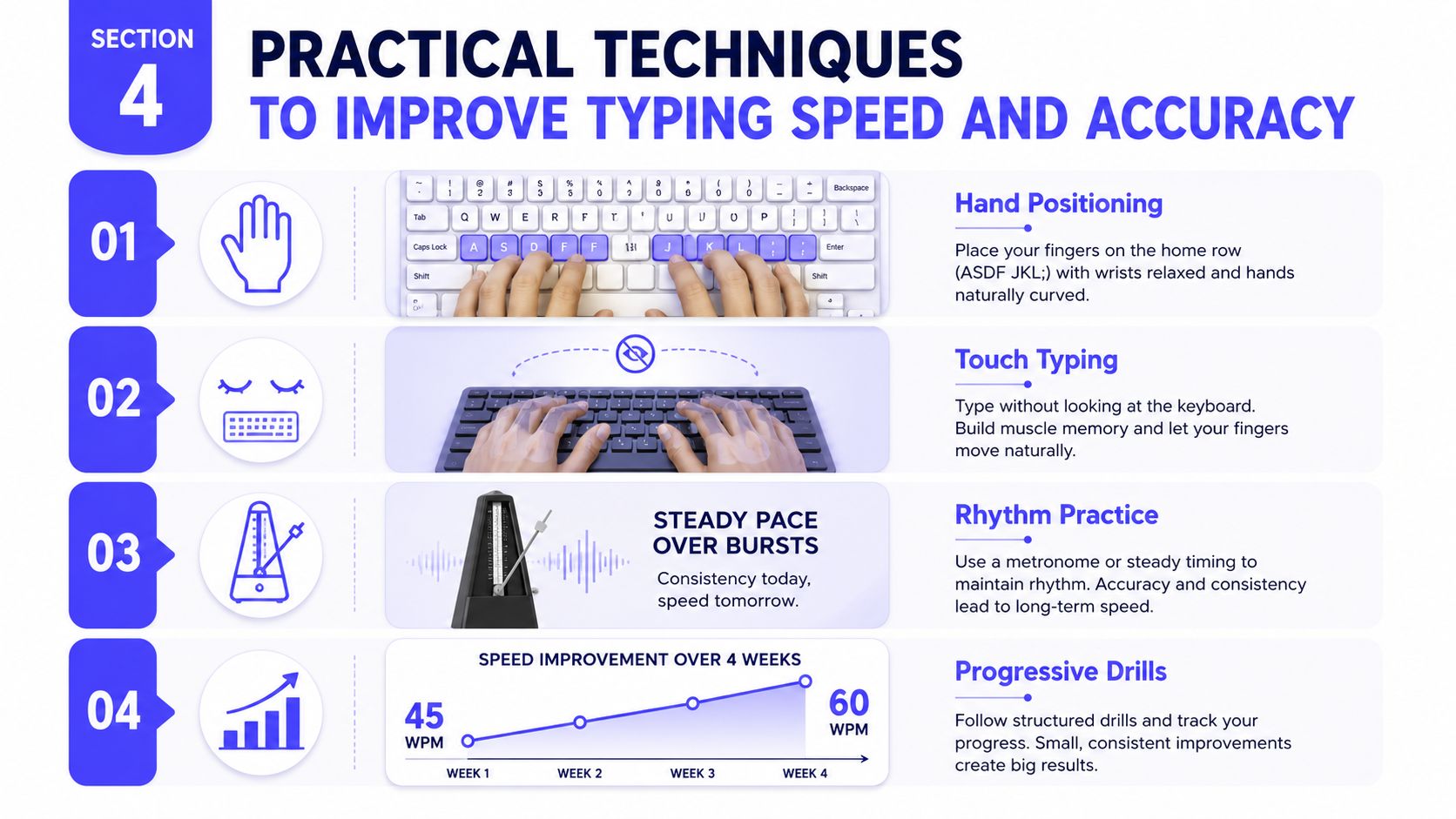
Improving from 45 WPM to a more comfortable professional range usually comes from cleaner habits, not from forcing the hands to move faster. The strongest typing guidance puts touch typing, steady practice, and accuracy ahead of raw speed, because clean input is what keeps a workflow from stalling when messages, notes, and updates have to be sent quickly (typing improvement guidance). For sales and other communication-heavy roles, that distinction matters more than a simple speed label, since every correction interrupts momentum.
Build the foundation first
Home-row placement lowers the need to hunt across the keyboard, which cuts wasted movement. Touch typing turns finger placement into habit instead of visual searching, so attention stays on the message rather than the keys. That matters in live work because fewer eye movements and fewer pauses usually mean fewer errors that need to be fixed later.
Practice rhythm instead of bursts
Short daily practice tends to work better than occasional long sessions. A steady cadence helps the typist avoid the common pattern of starting fast, then slowing down as accuracy drops. In workplace use, that matters because typing rarely happens under ideal test conditions, it happens in interrupted bursts between calls, messages, and system updates.
Use progressive drills, not random repetition
Practice is more effective when difficulty rises in stages. Start with clean accuracy, move into slightly faster output, then return to error checks so the pattern of mistakes becomes visible. That cycle helps identify whether the bottleneck is finger placement, word anticipation, or rushing through corrections.
For readers who want a broader view of repeatable performance habits, how to improve on sales with skills that actually stick is a useful reference point. The same logic applies here, consistent drills produce better typing gains than unfocused effort.
Useful habit: if accuracy drops as speed rises, slow the pace until the hands can keep up without mistakes.
Assessing Communication Skills Beyond Typing Tests
Typing tests measure output speed, but they do not show whether a person can communicate clearly under pressure. In client-facing work, that distinction matters. A candidate may hit a solid WPM score and still struggle to explain an objection, organize a follow-up, or keep a conversation moving when the context changes.
Why a keyboard test is only part of the story
A candidate can type efficiently and still underperform in live interaction. They may hesitate when a buyer pushes back, lose clarity in a fast exchange, or turn a simple message into extra editing work. The reverse also happens, a strong communicator with moderate typing speed can still perform well in sales if the role does not depend on constant documentation.
For a parallel perspective on professional communication, build clarity and confidence at work is useful context because it shows that written output is only one part of workplace influence.
What hiring managers should look at instead
A stronger evaluation pairs typing with observed communication behavior. That means watching how a candidate handles objections, how clearly they summarize next steps, and how quickly they respond when the conversation shifts. In sales hiring, that matters more than a single keyboard metric because the job is about persuasion, not stenography.
A useful comparison on how to make a great impression in sales and work fits this broader evaluation lens. First impressions and live responsiveness often carry more weight than a clean typing score.
The practical conclusion
Typing speed is a useful operational signal, but it should not be treated as a proxy for communication skill. In revenue roles, the best candidates combine enough typing fluency to keep up with the workflow and enough conversational control to move deals forward. That combination is what predicts stronger performance in sales and professional communication workflows, where stopping to correct errors can break momentum and slow the next exchange.
A reasonable hiring standard is to ask whether the candidate can maintain pace without sacrificing clarity. If the answer is yes, 45 WPM can be enough in roles that depend more on judgment, responsiveness, and clear follow-through than on constant text production. If the answer is no, the typing score matters less than the friction it creates in real work.
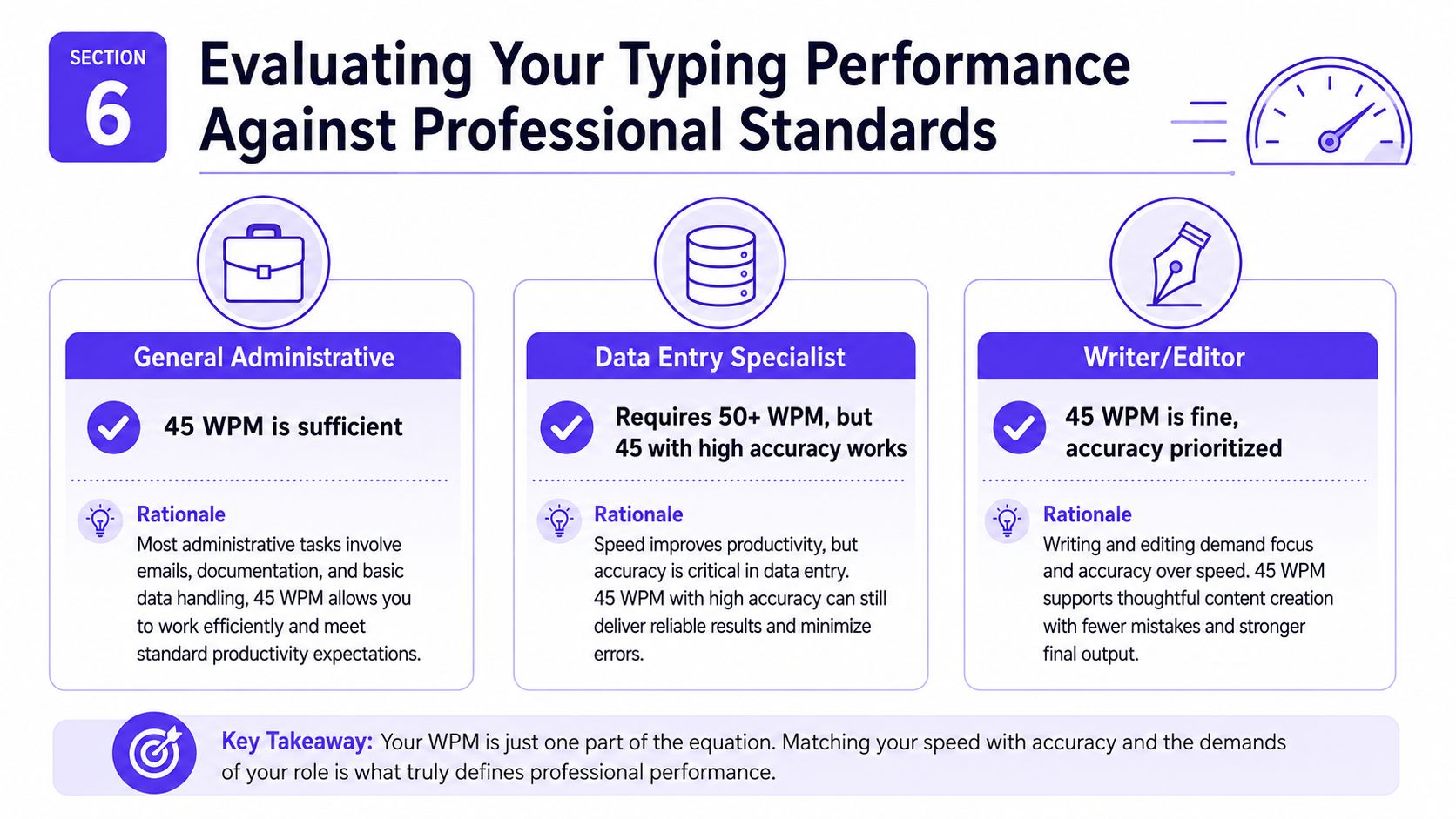
Evaluating Your Typing Performance Against Professional Standards
A 45 WPM score can be workable for general administrative work, but it sits below the comfort zone for data entry and other typing-heavy jobs. The more relevant test is whether accuracy stays high enough that corrections do not wipe out the time saved by faster typing. Guidance on typing accuracy guidance shows why error control belongs in the evaluation, not just raw speed. For sales and office roles, that is the part of the metric that changes day-to-day output.
Quick self-check
- General administrative work: 45 WPM is usually sufficient if accuracy stays steady and the work is not heavily text driven.
- Data entry or transcription-like work: 45 WPM is usually below target unless accuracy is unusually strong and the workflow leaves room for correction.
- Writing, editing, and knowledge work: 45 WPM is generally fine because clarity and correctness matter more than raw pace.
The best standard is the one that matches the job's communication load. A sales rep who spends time logging calls, updating notes, and replying to prospects needs enough speed to keep momentum, but not at the cost of repeated fixes that interrupt the flow of the conversation. A candidate who types quickly but pauses often to repair errors may lose more time than a slower, cleaner typist. In that setting, 45 WPM can be adequate in roles built around judgment and follow-through, yet still feel tight in workflows with constant live documentation.
A clearer benchmark comes from the work itself. If the role depends on frequent documentation, a higher target is worth pursuing. If the role is mostly communication and decision-making, 45 WPM is rarely the limiter. The better test is whether the typing pace supports the work without creating avoidable friction.