

A sales recruiter has three promising SDR candidates, two account executives in different time zones, and a hiring manager whose calendar is already full. Adding another 45-minute phone screen seems harmless until every candidate needs a separate slot, every interviewer needs to attend, and the strongest applicant accepts another offer while the team is still coordinating schedules.
An on demand video interview moves that first qualification step off the calendar. Candidates respond to structured prompts when they're available, while hiring teams review the same evidence against a shared sales rubric. The format can improve throughput, but it also introduces completion, accessibility, privacy, and fairness risks that sales teams can't treat as minor details.
Why Sales Teams Are Moving to Async First Screens
A sales recruiter coordinating a sales leader, frontline manager, and enablement partner can spend more time arranging interviews than evaluating candidates. Applicants may work shifts, travel between customer meetings, or live across time zones, so a live first screen often creates a scheduling bottleneck before anyone tests selling ability.
Video interviews are now common early in hiring. A recent industry roundup reported that 90% of organizations use video interviews at early hiring stages, while 74% of recruiters say virtual interviews have made hiring easier and 47% of employers say they speed up recruitment (HireTruffle's video interview statistics roundup). For sales teams, the benefit is operational: managers can review more applicants without reserving every available calendar slot.
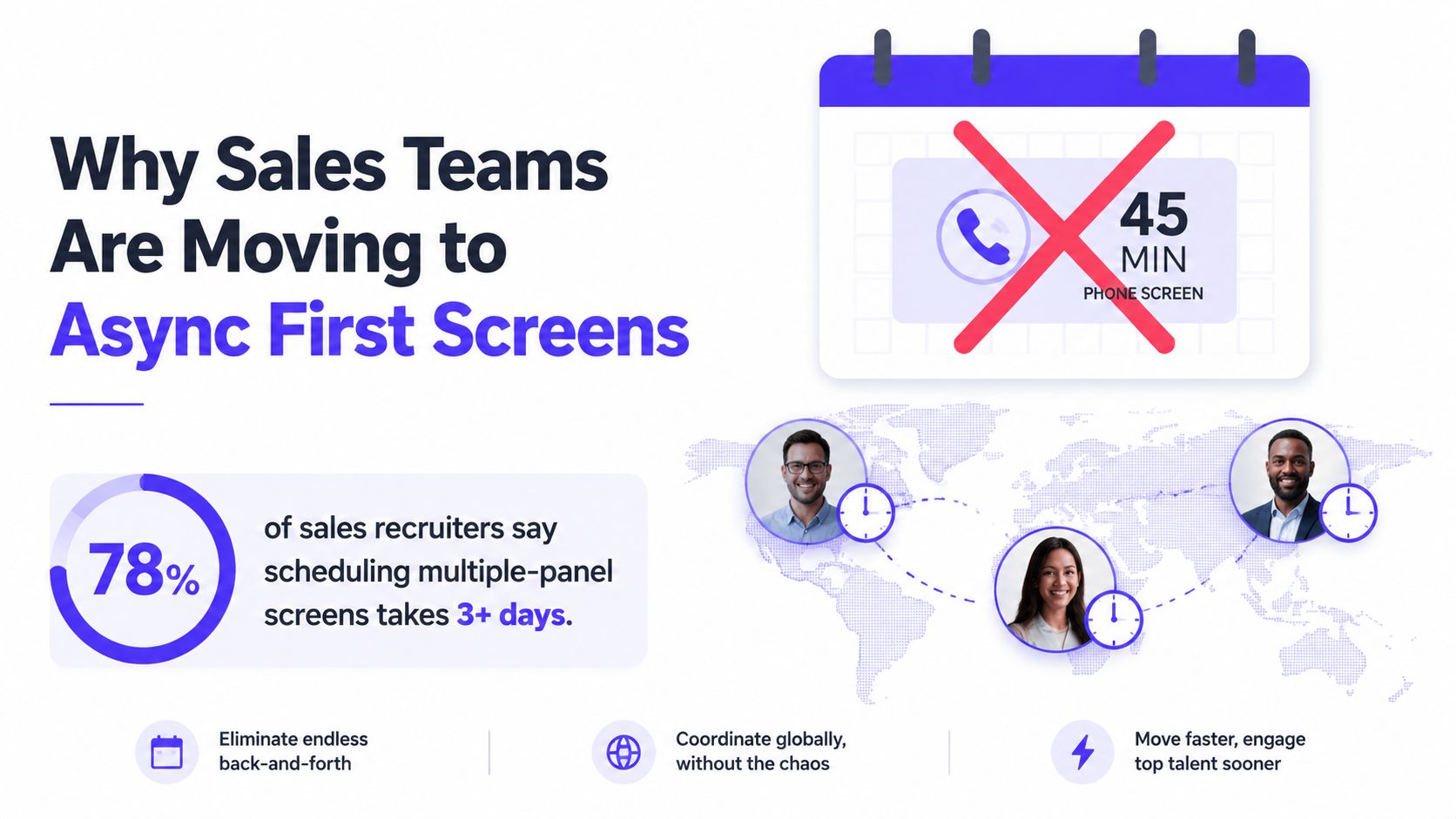
The operational case for an async first screen
Sales pipelines can contain more applicants than a small interview panel can assess live. A recorded first screen gives candidates the same core prompts and leaves reviewers with evidence they can revisit. Managers can compare how applicants qualify a buyer, handle an objection, or explain value instead of relying on scattered memories from separate calls.
The format also addresses a common point of candidate loss. The same roundup cites iCIMS' 2025 State of Frontline Hiring Report, which found that scheduling-to-interview accounts for 32% of all candidate losses. This finding makes scheduling a conversion issue, not only an administrative task.
Async video should still be a choice, not a reflex. Candidates may lack a quiet room, dependable equipment, sufficient bandwidth, or an accessible recording setup. A completion rate can look healthy while excluding applicants who face those conditions, so teams should provide clear instructions, reasonable flexibility, and a way to request help or an alternative.
A candidate's public professional presence may also enter pre-interview preparation. Teams reviewing it should follow a clear, role-relevant process, while resources such as clean up profiles with Digital Footprint Check can help candidates understand how online profiles may be evaluated.
Practical rule: Use async screening to protect manager capacity, while preserving human contact throughout the hiring process.
One-way video fits a first stage with narrow questions. It can test whether a candidate can qualify a buyer, respond to a common objection, or explain a relevant value proposition. The next step should be a live conversation, where the candidate learns about the role, compensation, sales motion, and manager relationship.
What an On Demand Video Interview Is
A live video interview requires everyone to join at the same time. An on demand video interview, also called an async, one-way, or recorded interview, gives the candidate prompts to complete independently. The hiring team reviews the recordings later and scores them against defined criteria.
The process has four moving parts.
The question set
The recruiter or hiring manager creates prompts tied to sales behaviors. A question might ask a candidate to run a short discovery exchange, respond to a pricing objection, or explain the next step after an initial call. Strong prompts work like small test cases: they require the candidate to show a behavior that matters in the role, rather than describe it in general terms.
The response window
Candidates receive a completion window and instructions. A longer window can accommodate work schedules, time zones, and accessibility needs. A shorter window may create a more controlled exercise. The operating decision is whether the deadline measures selling ability or mainly favors candidates with quiet space, reliable equipment, and uninterrupted time.
The recording environment
Candidates generally record through a browser or mobile application. The experience should explain camera and microphone permissions, provide an audio test, and offer a clear way to report technical problems. A candidate who cannot submit a usable recording should not automatically be treated as a weak salesperson. The team should first determine whether the barrier came from selling skill or the recording setup.
The review interface
Reviewers need playback, timestamps, notes, and a scorecard. A transcript can help locate evidence, but it should not replace watching or listening when tone, pacing, hesitation, and conversational control matter. Teams evaluating transcription workflows can consult this guide to automated video transcription while deciding how transcripts fit into review.
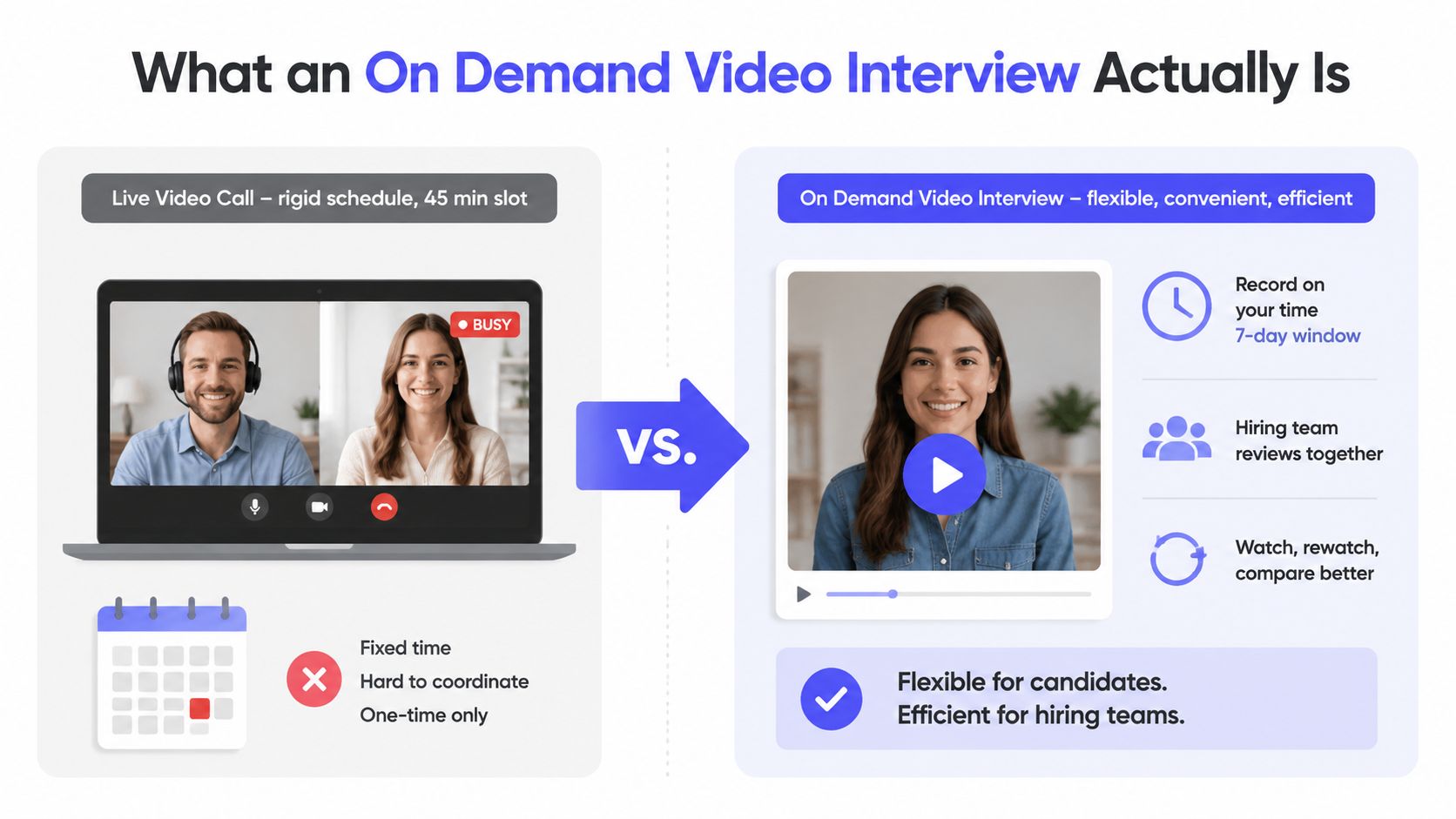
The candidate records answers without a live interviewer reacting in real time. That distinction matters in sales assessment. A recording can show preparation, structure, language, and judgment, but it may not reveal how the candidate adapts when a buyer interrupts, changes direction, or challenges an assumption. Use the format to gather evidence of prepared selling behavior, then reserve live assessment for real-time adaptation.
Benefits and Trade-Offs for Hiring Teams and Candidates
An async first screen changes the exchange for both sides. Hiring teams gain a structured way to compare sales responses and review them around their schedules. Candidates gain control over when they complete the exercise. That convenience has limits, especially when a team mistakes a tidy process for a fair one.
| Recruiter Side | Candidate Side |
|---|---|
| Faster shortlisting: Reviewers can assess recordings when their calendars allow. | Flexible timing: Candidates can choose a suitable time rather than attend a fixed meeting. |
| Consistent prompts: Each applicant receives the same core questions and instructions. | Less real-time rapport: Candidates can't build connection through a natural back-and-forth conversation. |
| Evidence tied to a rubric: Reviewers can revisit a specific answer before deciding. | Performance anxiety: A blank webcam can feel more stressful than a live discussion. |
| Lower first-round calendar load: Managers reserve live time for stronger prospects. | Technical exposure: Weak connectivity, audio problems, or limited devices can interrupt a submission. |
| Distributed review: Panel members can evaluate the same recording independently. | Screening perception: Candidates may feel processed rather than personally met. |
Candidate completion is an operating risk, not a minor detail. A 2025 summary reported that 33% of candidates quit applications requiring lengthy one-way video interviews, while 25% found video interviews more stressful than face-to-face interviews (1 Second Hire's 2025 video interview summary). A long prompt set can give recruiters more information from each submission while shrinking the number of applicants who finish. For sales roles, that may remove candidates who could sell effectively but cannot easily record under the required conditions.
Candidate trust affects the stage after submission. A field study plus three experiments found that asynchronous video interviews produced lower job acceptance intentions than face-to-face interviews, with a stronger effect among applicants with higher interpersonal trust propensity. The same study supports a practical design choice: explain why the exercise exists, how reviewers will use it, and what happens next. Clear instructions also help candidates distinguish a sales assessment from an automated filter.
The format can expose prepared messaging, structure, and judgment, yet it can also reward comfort on camera or hide accessibility barriers. A candidate with limited bandwidth, an unsuitable device, or difficulty with recorded communication may struggle to submit usable evidence even when their selling ability is stronger.
A strong first screen creates useful evidence without making the candidate feel that the hiring team has outsourced the relationship.
Having assessed these trade-offs, the next decision is how to design prompts that surface real selling behavior rather than interview performance.
Designing a Sales Assessment That Produces Real Evidence
A candidate can deliver a polished recording and still miss the behaviors that matter in a sales role. Design each prompt to reveal how the person thinks, listens, reframes objections, and earns a next step.
Start with the actual sales motion
Build one or two questions around the company's ideal customer profile. Give the buyer, business problem, and sales-cycle stage enough context for a reasonable decision. A generic “sell this pen” exercise mainly rewards improvisation. A role-specific prompt produces evidence the hiring manager can compare with the job's real demands.
For example, ask the candidate to respond to: “Your prospect says your pricing is 30% above the incumbent. Walk me through how you'd address that.” The reviewer can then assess whether the candidate acknowledges the concern, asks what the comparison includes, connects price to business impact, and proposes a relevant next step.
A practical assessment can include:
- Discovery scenario: Ask the candidate to open a conversation with a buyer facing a plausible business problem. Score the quality of the questions, not confidence alone.
- Objection response: Use a concern about price, timing, an incumbent vendor, or implementation effort. Look for acknowledgment, clarification, reframing, and progression.
- Value explanation: Ask the candidate to connect a product capability to the buyer's stated need. Strong responses separate features from business impact.
- Written follow-up: Request a short message summarizing the buyer's situation and proposing next steps. This tests listening, prioritization, and execution beyond the recording.
Set a response limit and provide a short preparation period. If the assessment uses a platform such as an on demand video interview tool, state whether candidates receive one recording attempt or can retake an answer. Disable retakes when first-response judgment matters, but disclose that rule before recording begins. Clear expectations can improve completion and help candidates distinguish a sales exercise from an automated filter.
Turn observations into comparable scores
Use five to seven observable criteria, each scored from 1 to 4 with behavioral anchors. Criteria might include questioning quality, objection reframing, value articulation, call control, responsiveness, clarity, and closing instinct. A score of 1 should describe visible behavior, such as asking no meaningful discovery questions. A score of 4 should describe a concrete standard, such as uncovering relevant context and earning a logical next step.
Two reviewers should score independently before discussing a response. If their scores exceed a threshold set in advance, they should reconcile the evidence instead of averaging impressions automatically.
Calibrate the rubric on the first ten responses before scaling the assessment. Reviewers can identify ambiguous prompts, inconsistent scoring, and criteria that reward presentation polish rather than selling behavior. Teams building a broader structured process can use this pre-hire assessment hiring guide as a planning reference.
Security, Accessibility, and Fairness Essentials
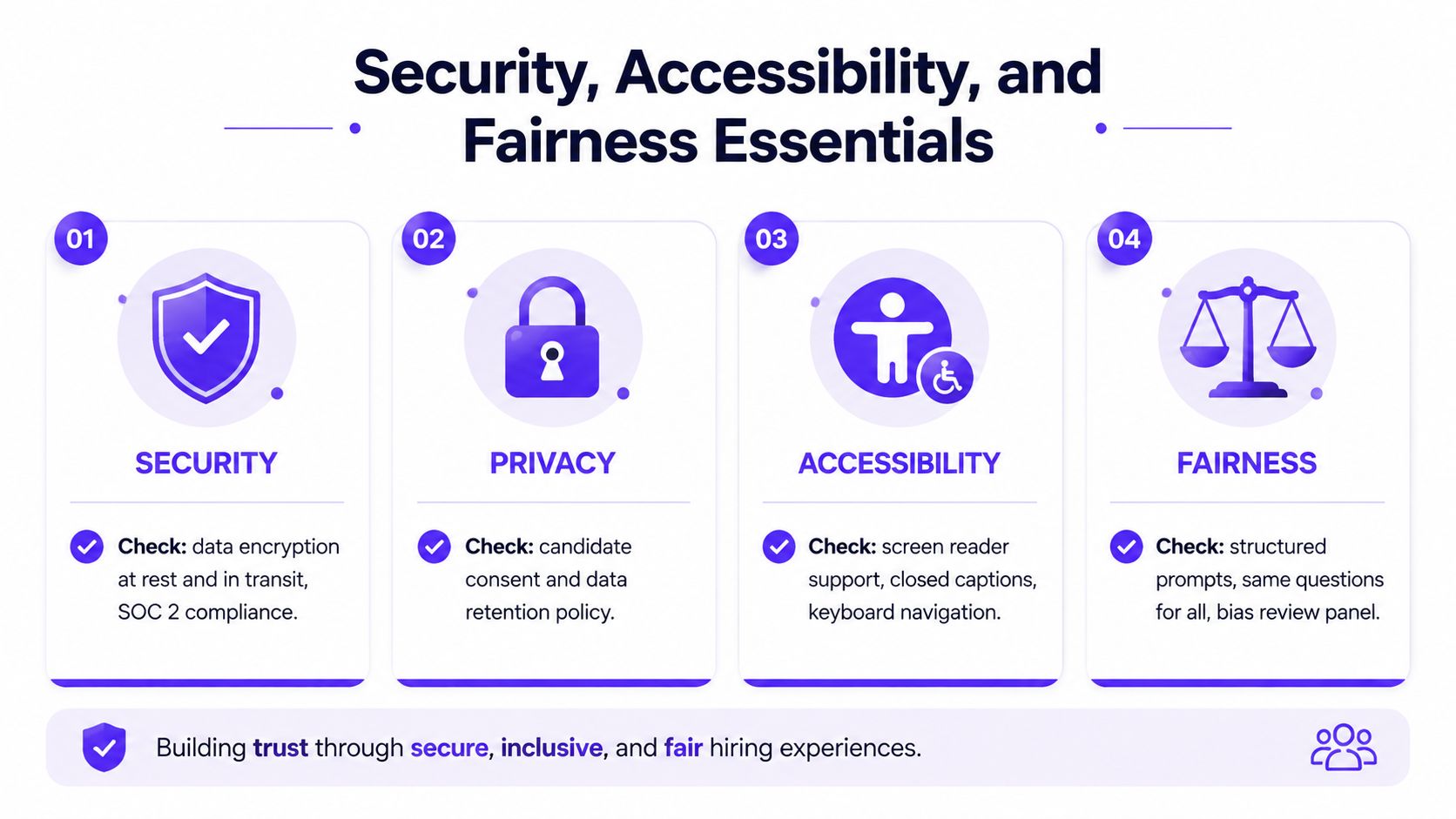
Security, privacy, accessibility, and fairness should be decided before a sales team invites candidates. A recording that is easy to collect but poorly protected creates privacy risk. A standardized sales prompt that some candidates cannot access reliably produces weaker evidence and an unfair comparison.
Set the controls before inviting candidates
Review the platform's encryption for uploads and storage, role-based reviewer permissions, and documented retention period. A hiring team might delete recordings within 30 to 90 days, if that period fits its legal, operational, and candidate-notice requirements. Document where candidate data is stored and who can export it.
Candidates need a clear consent notice and a practical way to request deletion. Reviewers should know whether recordings may be downloaded, shared externally, or copied into other systems. These rules apply even when the video is only an early sales screen, because access can spread beyond the original hiring group.
Accessibility testing should cover the devices candidates use. Prompts should include closed captions, the recording flow should support mobile devices, and keyboard or screen-reader navigation should work without unnecessary barriers. Candidates who need more completion time should have a defined accommodation path, rather than negotiating informally with one recruiter.
Treat technical reliability as assessment validity
A technical failure can erase evidence of discovery, objection handling, or closing judgment before a reviewer sees it. One 2025 roundup reported that 70% of candidates lost opportunities because of technical problems (OnRec's virtual interview candidate experience coverage). A separate 2026 survey found that 62% of candidates encountered issues such as poor connection or audio glitches. The same article also notes the need for device testing, retry support for genuine failures, and a human escalation route.
Audio quality deserves specific attention. Echo, room noise, and microphone conflicts can make a capable seller sound unclear, so teams evaluating recording setups may review guidance on master echo cancellation. The assessment should measure selling behavior, not the acoustics of a candidate's home.
Fairness requires more than sending everyone the same link. Use structured prompts, define scoring anchors, and conduct blind first-impression reviews where feasible. Track adverse impact across demographic groups over the first 100 hires, then document the action the team will take if patterns emerge. This guide to adverse impact in hiring explains the concept and the review process.
On Demand Video Interviews Compared to Live Roleplays
Async video and live roleplays answer different assessment questions. Async works well when the team needs consistent evidence from many candidates. Live roleplay is stronger when the job requires adaptive probing, rapport reading, and response to an unpredictable buyer.
| Dimension | On Demand Video Interview | Live Roleplay |
|---|---|---|
| Scoring consistency | The same prompts and rubric create comparable evidence. | Interviewer behavior can vary unless the exercise is tightly managed. |
| Scheduling effort | Candidates and reviewers work at different times. | Every participant must reserve the same time slot. |
| Behavioral depth | Shows prepared responses, structure, and initial judgment. | Reveals adaptation, listening, rapport, and pressure response. |
| Review model | Reviewers can replay evidence and score independently. | The panel observes the exchange in real time. |
| Cost per hire | Reduces live panel time during early funnel stages. | Requires more manager time but can produce richer late-stage evidence. |
The scheduling difference compounds as the applicant pool grows. A 30-minute live screen with two interviewers blocks 60 minutes of panel time per candidate, while an async process can consolidate review into 15 to 20 minutes per candidate when the assessment is tightly scoped. Those figures are operating assumptions for the comparison described here, not universal benchmarks. The right review time depends on prompt length, rubric complexity, and the number of reviewers.
Async therefore suits high-volume early screening and many SDR searches. Live roleplays deserve the scheduling cost for final-round account executive assessments, leadership roles, and positions where live rapport is itself a core job requirement.
Decision rule: Use recorded responses to compare candidates. Use live roleplays to test adaptation.
Neither format is sufficient when the assessment ignores the actual sales motion. A candidate can perform well on a generic roleplay and still struggle with the company's buyer, product complexity, or deal process. A more detailed simulation design can be found in this guide to role-playing for sales.
Choosing the Right Format for Your Hiring Stage
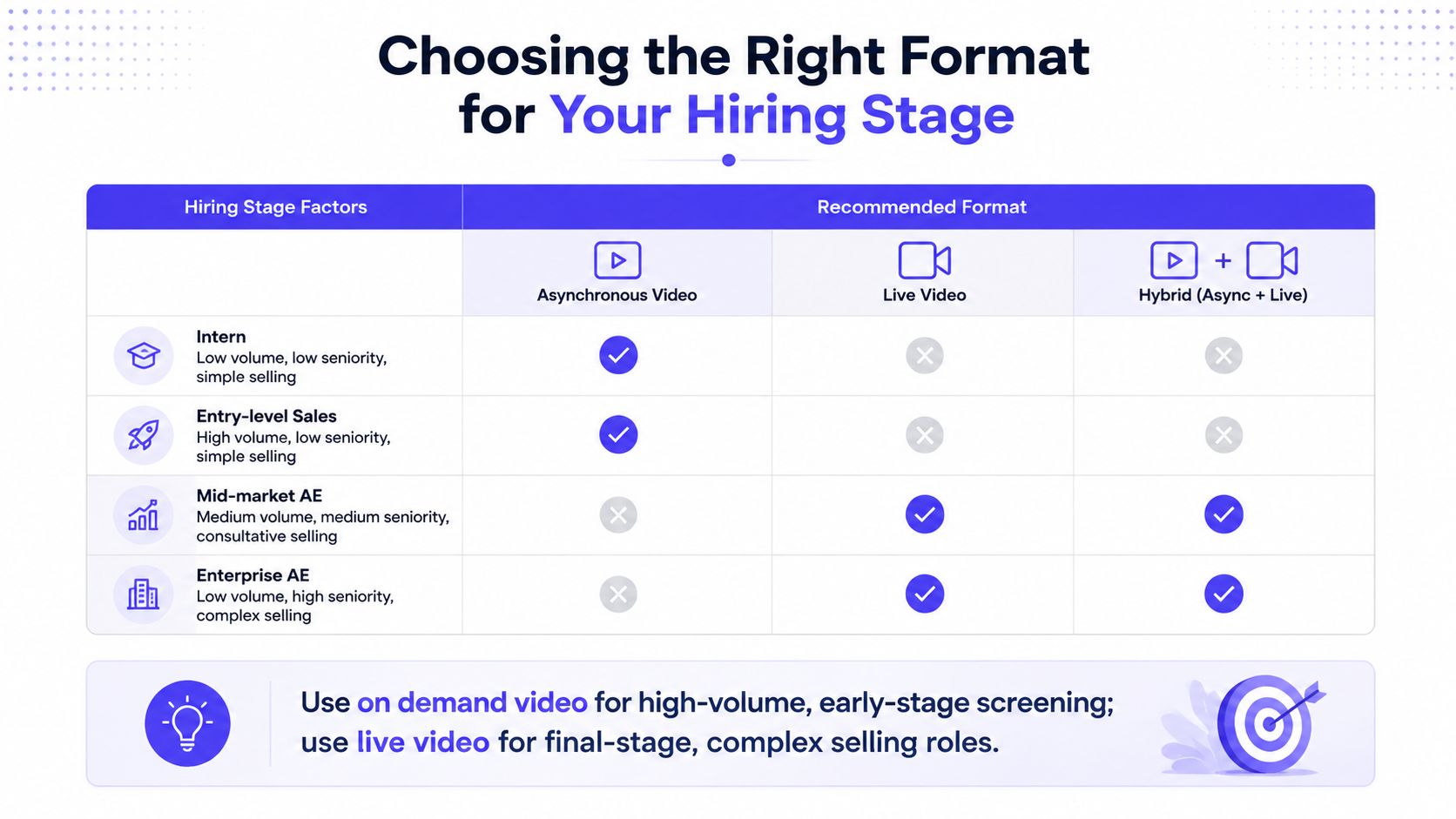
The right format depends on three inputs: role seniority, application volume, and selling complexity. A junior SDR role with high inbound volume usually benefits from a structured async screen because the team needs an efficient way to compare baseline communication, discovery, and follow-up behaviors. A senior enterprise AE role usually justifies live interaction earlier because the sales motion depends on complex discovery, multi-threading, and executive-level judgment.
A practical decision checklist
- High volume and early funnel: Choose an on demand video interview with a short, role-specific prompt set and a clear review rubric.
- Junior SDR or BDR hiring: Use async to test opening structure, discovery instincts, objection handling, and written follow-up before scheduling live conversations.
- Mid-market AE hiring: Consider a hybrid flow, async responses first, followed by a live roleplay for shortlisted candidates.
- Enterprise AE or sales leadership hiring: Favor live roleplays and deeper stakeholder conversations, because adaptive judgment and executive rapport carry more weight.
- Time-to-fill pressure: Use async to reduce scheduling delays, but preserve a live stage before making an offer.
- Ramp-sensitive roles: Align the assessment with the behaviors new hires must demonstrate during onboarding, rather than testing generic interview polish.
- Accessibility concerns: Offer an alternative path when the technology, timing, or recording requirement could prevent a candidate from showing relevant ability.
A hybrid process often provides the best balance. The async stage creates comparable initial evidence, while the live stage tests whether that evidence holds up in a responsive conversation. Teams should monitor completion, technical failures, reviewer agreement, and progression by stage, then adjust the assessment when the process filters out candidates for reasons unrelated to selling.
Overvue helps sales teams assess candidates through structured, ICP-based simulations that surface objection handling, call control, responsiveness, and next-step execution. Visit Overvue to see how asynchronous sales assessments can support a more consistent early funnel while preserving live conversation for the stages where it matters most.